- Solutions
- Pricing
Almost 70% of digital transformation initiatives fall behind schedule or fail outright.
Most companies try to fix these challenges with traditional IT upgrades, but modern digital transformation tools offer far more flexible ways to break out of legacy limitations.
Not because teams lack ambition.
Not because leadership isn’t supportive.
The bigger issue is what sits underneath. The outdated systems, slow development cycles, and workflows patched together over years of “we’ll fix it later.”
Each team finds its own shortcuts. And every shortcut becomes another layer of complexity.
The intent to modernize is almost universal. Everyone wants cleaner processes, tighter integrations, and reliable automation.
But the moment someone says “we need to rebuild this flow,” the room goes silent. Because rebuilds are slow. Expensive. Risky. And usually get pushed into next quarter… then the next… then forgotten.
This is the exact gap no code digital platforms bridge, the space between where companies are stuck and where they need to be. Not by replacing core systems overnight. Not by turning every employee into a developer. But by offering a practical, low-disruption way to modernize the workflows sitting between old systems and the real work people do every day.
Legacy systems usually fail in slow motion. A missing field. A delayed report. A process that should take ten minutes but takes two hours. The root of the problem isn’t always the system itself. It’s the ecosystem surrounding it.
Older systems aren’t designed for rapid change. A simple tweak, like adding a new approval step or syncing data to a cloud tool, becomes a full development request. IT is already under pressure, so small change requests pile up. Weeks turn into months. And business teams move on with temporary fixes because waiting is not an option.
Integrations add another layer of friction. Legacy software often predates modern APIs, so connecting it with new tools feels like forcing two different generations of technology to talk to each other. Yes, it’s possible. But it’s rarely graceful or cost-effective. This is also why companies are now exploring business modernization software that can extend legacy capabilities without rewriting them.
No-code platforms don’t solve legacy problems by rewriting the system. They solve them by reducing dependency on the system and shifting modernization where it’s easier, safer, and faster.
People often misjudge no-code. They imagine drag-and-drop screens and casual citizen developers building hobby apps. But the reality is different. Modern no-code platforms are engineered to handle serious business complexity while removing the slowest parts of traditional development.
When building a workflow that doesn’t require provisioning servers, writing boilerplate code, handling authentication manually, or creating UI from scratch, teams can finally focus on improving the actual process.
No-code also becomes a bridge between IT and business. Instead of business teams writing long requirement documents and waiting for developers to translate them, they can now collaborate in real time. Business users shape the flow. IT ensures the integrations, access controls, and security are right. Both groups work in parallel instead of waiting on each other.
Another underrated benefit is reduced technical debt.
In traditional development, every new feature introduces risk, code that must be maintained, dependencies that might break, and integrations that need updates. No-code platforms abstract away that complexity. Upgrades happen at the platform level. Components can be reused. And most changes don’t require rewriting foundations.
Thus, no-code platforms like CodeBlox shine because it doesn’t demand massive system overhauls. You can build new experiences, new approval flows, new dashboards, or even entire operational apps without touching your ERP, CRM, or database layer. The old system stays stable. The new layer delivers the speed and flexibility the business needs.
Companies that succeed with no-code follow a simple pattern: start small, validate fast, scale what works. Here’s how it begins.
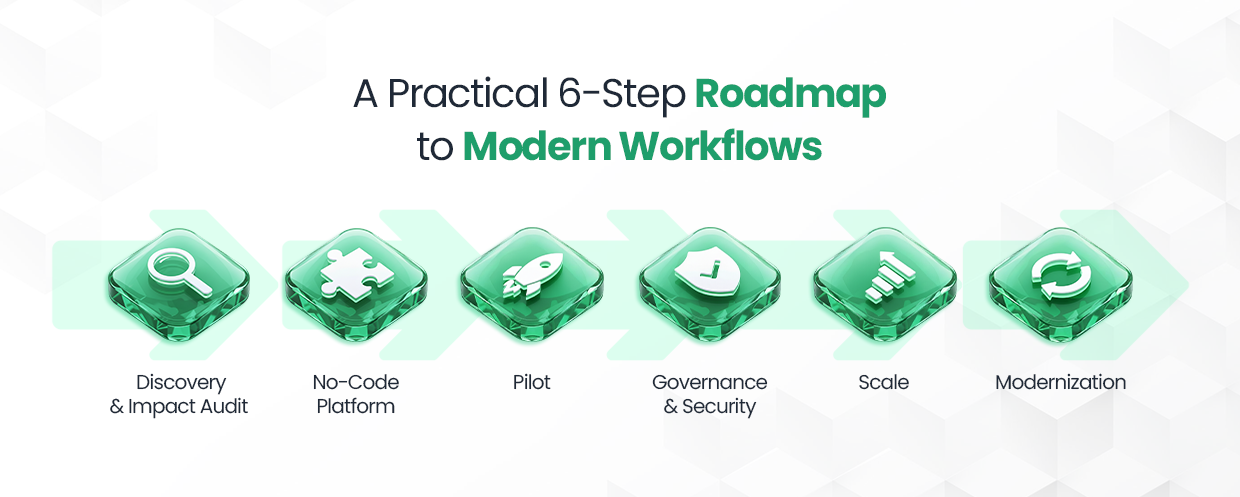
Before writing a single workflow, you need clarity.
Modernization fails when teams try to automate everything at once or choose the wrong starting point. The first step is understanding which processes actually deserve your attention.
This is where you map out your workflows with a very simple goal: identify where delays, manual errors, constant back-and-forths, and data inconsistencies originate. You don’t need a long technical document. You just need to spot what slows people down the most.
Typical high-impact candidates include approval flows, data collection tasks, checklist-driven operations, or anything involving repeated manual entry across systems.
By the end of this audit, you should have a short list of workflows that will deliver real value if automated — not tasks that look impressive, but tasks that genuinely drain time every day.
Once you know what you need to fix, you choose the digital transformation tool that can actually handle it. Not all no-code platforms are created equal. Some work best for simple forms. Some excel at enterprise automation. Some are brilliant for mobile apps. Others integrate deeply with ERPs.
The selection shouldn’t be based on marketing pages. It should be based on your process needs.
You evaluate:
Based on these factors, CodeBlox emerges as the most balanced no-code digital platform. It is powerful enough for IT, intuitive enough for business teams, and flexible enough for long-term modernization.
{CTA button:Explore CodeBlox:https://www.codeblox.com/solutions/no-code:Modernize workflows without touching your legacy systems. CodeBlox gives your teams the speed, flexibility, and control they need to automate processes safely without relying on long development cycles or risky rebuilds.}
Your pilot is where no-code stops being theory and starts being useful.
This is a short, focused build, usually two to four weeks, where you automate one of the high-impact workflows identified earlier.
During the pilot, you observe how quickly the workflow comes together. How easily it integrates with your systems, and whether users adopt it without friction. The purpose is simple: if the pilot doesn’t deliver real benefits in a few weeks, something is off.
When the pilot succeeds, you now have internal momentum and a real proof point to take into the next phase of transformation.
When teams discover how easy no-code makes things, the first instinct is to start building everything at once. And honestly, that enthusiasm is great—until it isn’t. Because without structure, even the most exciting enterprise automation wave eventually turns into another mess of disconnected apps, scattered data, and workflows nobody remembers creating.
That’s where governance steps in. Not as a blocker, but as the system that protects your velocity.
Before a pilot starts spreading across departments, you need a clear set of rules. Rules for who can create what, how data should be handled, what must be reviewed before something goes live, and who owns the workflow after launch. This includes the basics like role-based access, audit trails, approval gates, and version history. but also the invisible things that matter just as much, like how integrations are maintained or how often workflows need cleanup.
With proper governance in place, teams don’t slow down. They actually move faster because they are building inside a safe, predictable, well-lit environment where nothing breaks behind the scenes.
Scaling no-code isn’t about taking one successful workflow and copying-pasting it across the company. It’s about building a shared approach to automation, almost like creating an internal library your entire organization can pull from.
Once your pilot works, the next step is to design reusable building blocks: templates, connectors, forms, logic flows, and notification rules. When these pieces are built with intention, every new workflow becomes faster to create, easier to maintain, and far more consistent.
Every organization talks about modernization, but the reality is harsher: big upgrades are expensive, risky, and disruptive. No one wants downtime. No one wants to retrain hundreds of employees. And no one wants to gamble with the systems that keep the business running.
No-code offers a far more forgiving path.
Instead of rewriting everything, you modernize in layers. Some teams choose to wrap their legacy systems, like building modern, user-friendly workflows on top of old ERPs or CRMs. Employees get a better experience, and cleaner data flows.
Others use no-code to extend legacy systems with new forms, dashboards, modules, and approval flows the old software simply can’t support. Suddenly, your ancient ERP starts behaving like something built in 2025, without touching the core code.
You upgrade what makes sense today, refine what’s outdated tomorrow, and gradually phase out the parts of the legacy system you no longer need.
No-code can unlock huge wins, but like any powerful tool, it comes with a few traps mostly when companies jump in without a plan. Here are the big ones to watch out for:
When every team builds in isolation, you end up with dozens of workflows nobody owns. Different structures. Different rules. Zero alignment.
How to avoid it:
Set a simple governance model early. One owner. One review step. One shared data approach.
If a platform doesn’t support easy data export or portability, you’re stuck. Migration becomes painful and expensive.
How to avoid it:
Choose platforms with open APIs and clean data export. Prefer those built on standard schemas.
If every workflow uses different fields, labels, structures, and formats… Your reporting becomes a nightmare.
How to avoid it:
Use a central data dictionary. Define key fields once and reuse them across apps.
Some no-code tools are great for small teams, but choke when hundreds of users join or when workflows become complex.
How to avoid it:
Stress-test during the pilot itself. Not after rollout.
If the process is broken, automating it just makes the problem faster.
How to avoid it:
Fix the process → then automate.
With the right platform, a clear rollout plan, and a bit of governance, no-code becomes transformative. Treat it like a strategic investment, not a quick experiment, and it will pay off every single quarter.
Evaluating no-code platforms can feel overwhelming because every vendor claims to be enterprise-grade, scalable, and secure. But real evaluation goes beyond marketing.
Start with integrations: if a platform doesn’t connect reliably to your ERP, CRM, or core databases, it won’t go far. Security is equally important. SSO, encryption, and audit logs are non-negotiable.
Governance tools matter too. If the platform doesn’t offer version control, app lifecycle management, or role-based access, you’ll hit operational limits very quickly. Scalability is often hidden behind technical jargon, so test it during the pilot instead of trusting a PDF.
And finally, look at the cost structure. Connector costs, automation run limits, API quotas, and the cost of vendor support. A platform may look affordable upfront, but quickly become expensive at scale.
Start with simple but powerful metrics like cycle time and how long a process takes before and after automation.
Reducing manual touchpoints is another clear indicator of efficiency. Fewer touches almost always mean fewer errors, faster processing, and more predictability. Adoption rate tells you whether teams actually use the new system, while throughput shows how much more volume your processes can handle.
Finally, look at SLA compliance. If your automated workflows help your team meet deadlines more consistently, that’s a strong signal of operational maturity. Together, these KPIs paint a clear, compelling picture of ROI that you can confidently present to leadership.
If you are ready to modernize your workflows without taking on a risky system rebuild, CodeBlox no no-code platform is one of the safest and fastest paths forward. We help organizations identify the right workflows to automate, build their first pilots, and scale automation across teams with strong governance and minimal disruption.
{CTA button:Book a CodeBlox Demo:https://calendly.com/hello-codeblox:Want to see how no-code can transform your workflows? Our team will walk you through a live demo of CodeBlox, map your use case, and show you exactly how fast and low-risk modernization can be.}
Find answers to the most common questions about our no-code platform and how it can help you build powerful business application solutions without writing a single line of code.
%20(1).avif)
Chris has spent more than a decade designing and delivering enterprise software for organizations with complex operational requirements. Drawing from real implementation experience, he writes about enterprise architecture, CRM strategy, digital transformation, software modernization, and the challenges organizations face when scaling business operations.
.avif)
%20(1).avif)

%20(1).avif)

.avif)
.avif)
.avif)

.avif)

.avif)
.avif)
.avif)


.avif)
.avif)
.avif)
.avif)
.avif)
.avif)
.avif)
.avif)
.avif)
%20(1).avif)

.avif)






.avif)
.avif)
.avif)
.avif)
.avif)

.avif)
.avif)
.avif)

%20(1).avif)
.avif)