
- Solutions
- Pricing

The global CRM software market is projected to reach $145 billion by 2030, growing at an 8% annual rate, according to Statista. The numbers tell that CRM is becoming a top choice for every business. But the reality of businesses using it? Well, that’s another story.
Most companies already use a CRM. But the question is, does their CRM understand how their industry works? Generic platforms handle contacts, pipelines, and basic reporting reasonably well. What they cannot handle is the operational complexity underneath. These complexities can be related to compliance requirements, approval chains, and sector-specific data structures. And this is exactly where an industry specific CRM comes in. In 2026, the gap between a general-purpose platform and one built for your sector is too costly to ignore. Let us get into the details.
An industry-specific CRM is not simply a standard CRM with a few custom fields added. It is software designed specifically around how your industry actually operates. It includes detailed workflows, data structures, compliance requirements, and reports specific to your line of work. Think of it less as a tool to configure and more as a tool that already understands the business.
This is what an industry CRM practically includes:
The core difference is very simple. A generic CRM is built to be adapted, whereas a CRM software by industry specification is built so that adaptation is minimal from day one.
And that very contrast makes it easier to understand why generic platforms struggle in regulated environments. But let’s deep dive into it for further clarification.
Most businesses don’t notice the gaps in a generic CRM when they first purchase it. On paper, everything seems to fit. The issues usually appear three to six months after launch. It begins when your teams start working on spreadsheets again and building manual workarounds. And finally, they are left with no other choice but to request customizations!
Generic CRMs are not weak systems. They simply are not designed around how your industry functions every day. They focus on contact management and deal stages. Real operations, however, involve approvals, compliance checkpoints, documentation tracking, and connected systems. That difference becomes obvious once real workflows begin running inside the platform. Here are examples from three industries:
A healthcare provider needs consent tracked against every patient interaction, insurance verified before treatment, and follow-up compliance logged at each stage. A generic CRM is not built for this. It treats clinical workflows as pipeline stages, which means staff fill gaps manually and audit trails are never structured the way regulators expect.
Manufacturers need customer orders linked to bills of materials, service tickets tied to serial numbers, and warranty claims connected to production batches. Generic platforms store these as unrelated records. Connecting them requires manual effort or custom integrations, both of which add cost and break over time.
Banks and lending institutions need KYC documents verified before deals progress, risk scores attached to records, and approval chains that leave a clear audit trail. Most generic platforms cannot handle this natively. When those external tools break or fall out of sync, compliance gaps appear and are hard to catch quickly.
This is why an industry-specific CRM exists. Generic platforms can handle the basics, but the moment industry-specific processes come into play, customization becomes unavoidable (and expensive too!)
Put simply, try to understand what each option actually involves before you commit to any platform.
If you are trying to adapt to CRM software, understanding these pros and cons would come in handy:
Advantages:
Disadvantages:
For businesses in heavily regulated industries, the advantages tend to outweigh the costs. For businesses that operate across multiple verticals, a more flexible approach to CRM software by industry may be the better fit. Either way, the decision comes down to how closely the platform matches the way the business actually operates.
Not every business needs an industry-specific CRM. But if your current CRM is creating more friction than it removes, that is usually a sign the platform was not built for how your business actually operates.
Here are the clearest signs to watch for:
If two or more of these are familiar, a generic platform is likely costing more in workarounds than an industry specific CRM would cost in licensing. The comparison table below puts both options side by side so the tradeoff is easier to see.
A generic CRM looks cheaper upfront, but configuration and maintenance costs add up. An industry-specific CRM costs more to start, but those hidden hours often close the gap faster than expected. Once you have picked your platform, the next step is getting the implementation right.
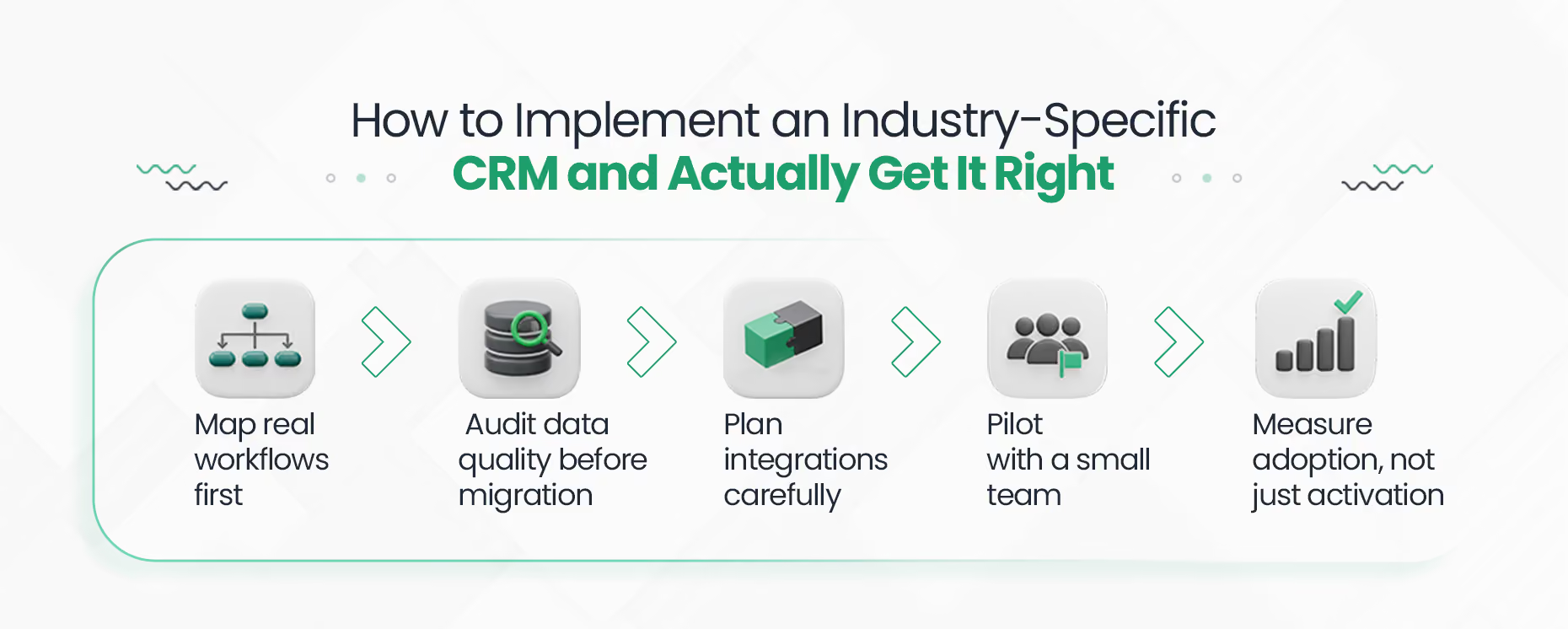
Getting an industry CRM deployment right takes structure. Skipping or rushing any phase is where most implementations go wrong.
Talk to the people using the system daily. Document what actually happens, not what is supposed to happen on paper. Approval chains, handoffs, and recurring exceptions all need to be captured before anything is built.
Look at what you currently have before moving anything across. Duplicate records and inconsistent fields do not fix themselves after migration. They get worse.
List every system that needs to connect, whether that is ERP, billing, eCommerce, or compliance databases. Poor integration planning is the most common reason CRM projects stall right at go-live.
Do not roll out to everyone at once. A small group surfaces real problems that testing never does. Expect some pushback and build feedback loops early.
Check whether people are actually using the system. Also, see if the reports it generates are helping with real decisions. If they are not, something in the configuration needs another look.
The industry-specific solution to CRM that works is built around how people actually operate, not how someone assumed they would. Get that right, and the return shows up quickly.
The returns on well-implemented CRM are well-documented. The average ROI of CRM is $8.71 for every $1 spent, according to enterprise deployment research. When AI is added, McKinsey reports a 40 to 50 percent reduction in manually handled service interactions.
A simple way to track the ROI is this:
Revenue uplift + time saved on manual tasks – implementation cost = net ROI
Let’s look at two examples to understand this!
Example 1: Retail
Matouk, a luxury textile manufacturer, achieved a 223% ROI with a six-month payback after implementing CRM. Moreover, it generated over $1.6 million in average annual benefits.
Example 2: Healthcare
A healthcare company that deployed CRM to replace manual CRM processes achieved a 139% ROI with a payback period of 1.3 years and average annual benefits of over $1 million.
Well, the ROI here is not just a revenue number. It also shows up in hours recovered, errors avoided, and compliance costs that never materialize. With that in mind, the next question is how to get there without getting locked into the wrong vendor. Let’s see!
Vendor dependency is one of the most common reasons businesses stick to a generic CRM longer than they should. Traditional vertical CRMs mean accepting a fixed roadmap and limited ability to adapt without waiting weeks for changes.
However, there is a more practical path, and that is to opt for a no-code CRM builder, such as one that CodeBlox offers. It basically gives businesses the ability to build their own industry specific CRM without long development cycles or external dependency for every change.
You define the workflows, data fields, approval chains, and reports. The platform handles the rest.
If you need the precision of an industry specific CRM but want to stay in control of how it grows with your business, this is worth a closer look. It is faster to set up, easier to adapt, and does not lock you in the way traditional vertical CRMs do. See how Codeblox works!
A CRM that does not fit how your business works is not a tool. It is just extra work. Data lives in exports, compliance tracking is manual, and reports require workarounds every single time. That is not a software problem. It is a fit problem, and it does not get better on its own.
Take a look at what your current platform cannot do without heavy configuration. Then ask yourself honestly whether that ongoing cost is worth it, or whether starting with the right system makes more sense for where the business is going.
{CTA button:Contact Us:https://www.codeblox.com/contact:<h3>If an industry-specific CRM sounds like the right direction for you. Talk to Codeblox about building yours.</h3>}
Find answers to the most common questions about our no-code platform and how it can help you build powerful business application solutions without writing a single line of code.



%20(1).avif)