
- Solutions
- Pricing


Administrative work in schools hasn’t just increased over time. It has become harder to manage.
There are more processes, more expectations from parents, more reporting requirements, and far more coordination between teams than before. But there hasn't been much of a shift in how most schools approach this task. Spreadsheets, emails, and people remembering what has to be done next still play a big role.
That’s where things slow down.
If we put it in simple words, school workflow automation means identifying those parts of daily operations and building a proper process for them. And something that will not require constant manual intervention.
Let’s dive deeper into the details.
If you look closely at daily operations, the inefficiencies don't show up dramatically. They, however, appear as small, repeated gaps. And out of all the possible aspects, admissions is one of the first areas where things start slipping.
Schools experience inquiries coming through multiple channels. But the follow-ups of those enquiries are not always tracked. Over time, it leads to missed opportunities like missed admissions, incomplete application conversions, lost high-intent parent inquiries, and reduced enrollment rates. The fact that people tend to realize these drop-offs a lot late which makes things even worse.
A few other examples that one could think of are:
Moreover, departments often operate in silos. The same data gets entered multiple times, which increases the chances of a mismatch and error.
If seen individually, these issues seem to be quite manageable. However, collectively, they slow down the entire system. This is exactly where school administration automation starts becoming necessary!
When people think about automation, they assume that it will replace people. But, in reality, it does quite the opposite. Adopting automation fixes how the admin work is done. Put simply, the goal of automating any admin task is to reduce constant follow-ups, reminders, and manual tracking.
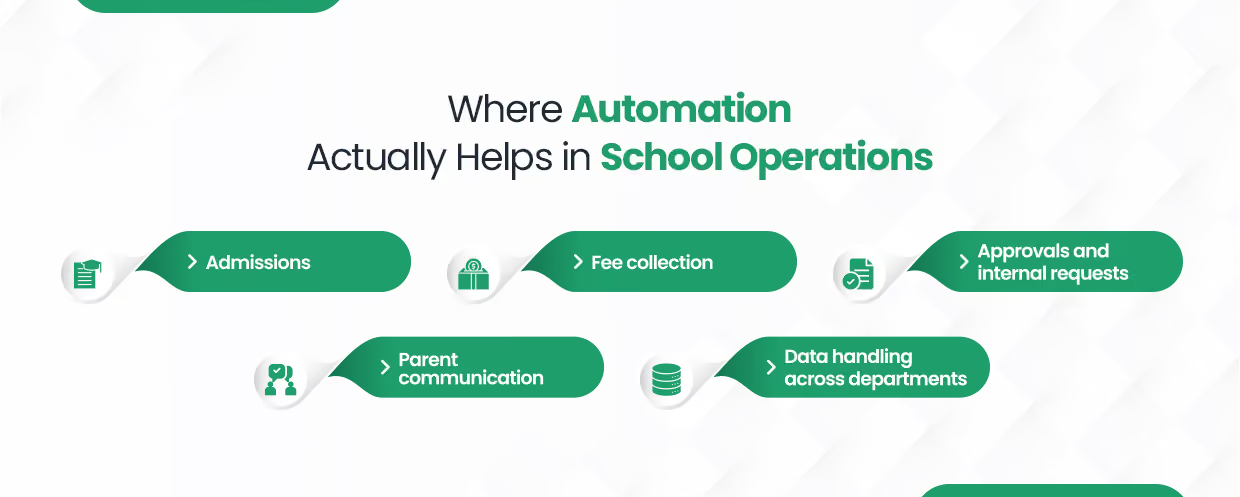
If we break it down, here are the areas where this actually makes a difference:
Once an inquiry comes in, the next steps are usually fixed, such as assigning it, following up, and updating the status. However, when done manually, a few things can get missed. With automation, every inquiry follows a clear path, so no lead is ignored.
Along with admissions, fee management is another area where gaps show up quickly. Reminders, payment tracking, and updates are often handled manually, which leads to confusion, especially closer to deadlines. With automation, reminders are scheduled, records are updated, and pending payments are flagged without extra effort.
Similarly, approvals tend to slow things down when they rely on emails or verbal communication. Requests often sit pending without clear visibility. With a defined flow, each step is tracked, and delays become easier to identify.
At the same time, communication depends heavily on someone sending updates at the right moment. This often results in delays and missed messages. However, with automation in place, all the notifications are sent on time as well as consistently.
Finally, across departments, the same data is often entered in multiple places. As a result, errors and mismatches increase. When systems are connected, data moves automatically, which reduces repetition and keeps records aligned.
Once all of these small gaps are fixed and structured properly, they remove a lot of unnecessary effort from daily operations. This is where the education process automation starts showing real impact.
Even roughly around 78–80% of educators surveyed plan to use automation to reduce the manual load of admin tasks! This transition is also part of a larger digital transformation in schools, where institutions are actively working to create more efficient and integrated systems.
{CTA button:Book a Call:https://www.codeblox.com/schedule-demo:<h3>If you are already thinking about fixing these gaps, it makes sense to look at how it can be done properly (with zero lines of code!)</h3>}
Most schools try to automate everything at once, and that is where things start getting complicated. However, the expert advice is to start off with automating things that are currently requiring most of the manual effort.
This process will help you find that out and, accordingly, move ahead:
1. Understand current workflows
Look at how things are currently being done, step by step, across departments.
2. Identify manual-heavy tasks
Find out which tasks take the most time and effort to manage manually.
3. Spot delays and gaps
Notice where work usually gets stuck, delayed, or missed.
4. List repetitive activities
Focus on tasks that happen frequently and follow the same pattern.
5. Check dependencies
See which tasks depend on approvals, follow-ups, or multiple people.
6. Prioritize key processes
Start with processes that directly impact admissions, fees, or parent communication.
7. Define clear workflow steps
Break each process into simple, structured steps that can be followed consistently.
8. Set rules for automation
Rule-based automation decides what should happen at each step based on conditions or actions.
9. Implement in phases
Automate one or two processes first instead of doing everything together.
10. Monitor and improve
Track how the workflow performs and make changes where needed.
That looks like a lot, right? Turns out, something this critical doesn’t really fit into a “5 simple steps” checklist.
That being said, the most important thing is that people handling these processes daily should be involved. They know exactly where things slow down and where errors usually happen.
Once you start mapping out how things actually work, one thing becomes clear. Not every process is ready to be automated as it is. Most schools know what they want to automate. The real gap is in how that process is structured in the first place.
For a workflow to work properly, it needs clarity at every step.
If any of these are absent, the process will still depend on manual effort. In most cases, only a certain part of the workflow is automated. While the rest continue to rely on manual follow-up and coordination. As a result, the same small gaps continue to exist, but in somewhat altered form.
And the majority of setups fail at this point. Let's look at this part of automating school workflows more closely.
A lot of schools have already tried automating their admin work and walked away disappointed. They invested in school management software, but it never really became part of daily work. And down the line, the system just sat there, underused.
The problem usually comes down to how rigid the software is. It's no news that school processes are rarely straightforward because there are always exceptions. A student might be on a custom payment plan, or maybe the attendance rules may differ by grade. Even approval flows can vary depending on the request.
Now, when the system cannot handle these situations without manual fixes, people lose trust in it and fall back to the traditional methods!
Other common mistakes that schools make include the following:
Schools that see real, long-term results approach do not make these mistakes and do things differently. They take the time to map how things actually work, including all the exceptions. They separate what is repetitive from what needs human judgment. They design the process properly before implementing anything and keep reviewing it even after it goes live.
Ultimately, once automation is implemented correctly, the changes are visible across the school.
As per industry reports, institutions that invest in process automation experience a decrease in manual labor and an increase in operational efficiency. This immediately helps employees concentrate more on their academic duties rather than administrative burdens.
CodeBlox is built for schools that have outgrown spreadsheets but don’t want to deal with rigid systems that don’t adapt. It brings admissions, fees, attendance, approvals, and communication into one connected setup, so nothing runs in silos.
What makes it a practical choice is that you don’t need technical expertise to run it. With this no-code approach in education technology, your team can set up workflows, define rules, and handle exceptions on their own. Whether it’s a custom fee plan, different approval flows, or changes in process, you can adjust things without waiting on developers.
At the same time, everything stays in sync. At the same time, everything stays in sync. Additionally, there is no duplication or manual updating because data is transferred between departments. That too, automatically!
It is both adaptive enough to meet your school's current operations as well as flexible enough to do away with the constant follow-ups and guesswork. If your processes change, workflows can be modified without having to start over.
If your administrative work is starting to feel harder to manage, this is a sign that your system needs fixing! See how a no-code solution can do that for you.
{CTA button:Book a Demo:https://www.codeblox.com/schedule-demo}
Find answers to the most common questions about our no-code platform and how it can help you build powerful business application solutions without writing a single line of code.



%20(1).avif)