
- Solutions
- Pricing

Managing HR manually usually feels manageable when the team is small. Most things are handled through memory, messages, or simple spreadsheets, and nothing feels difficult.
As the team grows, the effort required to manage the same tasks increases. This usually starts becoming noticeable somewhere between 20 to 50 employees. Information starts getting repeated in different places, approvals take longer because they depend on follow-ups, and the person handling HR spends more time coordinating than actually supporting employees.
At this stage, most companies start trying out tools. Some use one platform, others combine multiple tools to cover hiring, payroll, and employee records. Even after adding these tools, the overall process does not always become easier to manage. Teams still end up switching between platforms or maintaining parallel records.
There is also a time aspect that becomes important. According to Deloitte, HR professionals spend a significant portion of their time on routine administrative work. When that continues over time, work related to hiring quality, employee experience, and retention does not get enough attention.
This is where cloud-based HR management software built with no-code starts becoming relevant. Why? Well, because it focuses on how the entire system works together instead of adding more tools.
Why Traditional HR Systems Become Difficult to Work With?
A lot of HR tools available in the market are designed with a standard structure in mind. As long as a company’s workflows follow that structure, things work fine. But once processes start changing, even slightly, adjustments become harder to make.
Some common situations teams run into:
What’s surprising is that even Gartner reports that only 24% of HR teams feel they are getting full value from their existing systems. This figure aggressively points to a gap between what most tools offer and what teams actually need.
At that point, adding more tools does not solve the issue. What helps more is using HR automation software that can adjust to how the company operates.
Cloud-based HR management software is a system that stores employee data online and allows HR teams to manage processes like hiring, onboarding, and approvals from a single platform.
Earlier, cloud-based mainly meant that software could be accessed through a browser, but the way the system worked remained fixed.
Today, a modern cloud-based HR management software does more than just provide access. It keeps all employee data in one place and allows teams to define how processes should run. Forms, approvals, and dashboards can be set up based on company policies instead of following a fixed structure.
This shift allows companies to use systems that match how they operate, instead of adjusting their processes to fit a tool.
No-code supports this by making it possible to set up and modify these systems without technical support. In the upcoming section, let’s explore this in a bit more detailed manner.
No-code is becoming a practical choice for HR teams because it allows them to create and update HR processes without depending on developers.
HR processes change frequently. Policies get updated, hiring needs shift, and team structures evolve over time. Earlier, even small changes required technical support, which added both time and cost. Because of this, many teams continued using manual workarounds instead of improving their systems.
With no-code, HR teams can manage these changes on their own. Workflows can be created, updated, and adjusted using simple interfaces, which makes the process faster and easier to maintain.
Changes that earlier required multiple steps can now be handled much more quickly.
Gartner’s 2025 data shows that many organizations already use no-code platforms across departments, and HR is one of the key users. This is mainly because HR processes need flexibility and regular updates.
Most no-code HR systems are built on two core parts:
CodeBlox supports both layers, which allows HR teams to manage data and processes within a single system.
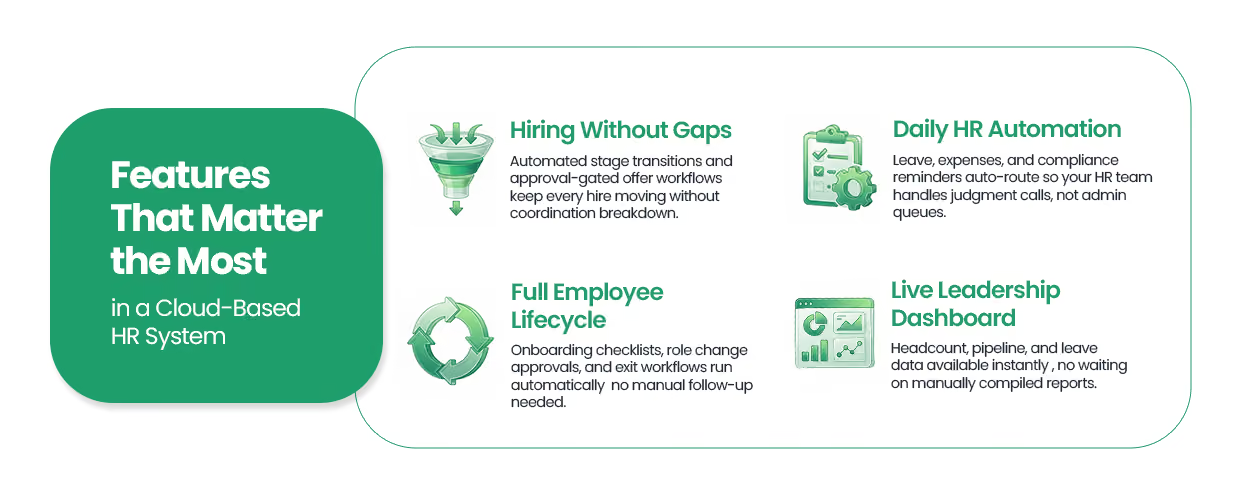
Rather than cataloguing capabilities, it is more useful to look at outcomes. A well-built online HR management system should solve four specific operational problems.
Most hiring processes break down through poor handoffs and missing visibility. A structured pipeline with automated stage transitions, interview scheduling, and approval-gated offer workflows removes the coordination work that typically falls through the cracks.
Joining, changing roles, going on leave, and leaving the company should each follow a defined process rather than depending on whoever happens to be available.
With no-code, onboarding checklists trigger automatically on a hire date, role-change workflows route to the right approvers, and exit processes capture equipment returns and access revocations without manual coordination.
Leave requests, expense approvals, policy acknowledgments, and compliance reminders account for a significant portion of HR's daily workload. Automated onboarding alone improves new hire retention which reflects just how much manual friction these routine processes introduce.
HR workflow automation handles the routing, notifications, and follow-up so the HR team can focus on situations that genuinely require human judgment.
Founders and HR leads need headcount data, pipeline status, and leave summaries available without waiting for someone to compile a report. Live dashboards built on top of a structured data layer make this possible without any manual data collection.
These are the three scenarios where implementing the HR no-code solution can make a huge difference.
In the early stages, a small team can manage HR through emails, messages, and memory. As the team grows to around 50 people, this approach becomes harder to manage. Onboarding may not follow the same steps for everyone, policy-related questions take longer to answer, and leave records are spread across different chats or tools.
A structured cloud-based HR management software built on no-code helps bring everything into one place. It gives growing teams a system that HR managers or operations leads can set up and manage from the start.
When employees work from different locations, managing HR without a centralized system becomes difficult. Leave approvals may happen informally, documents may not stay updated, and compliance requirements can vary by region without proper tracking.
A centralized online HR management system helps keep everything consistent. With a cloud-based setup, workflows can be defined clearly so that approvals, records, and policies are followed the same way across all locations.
Industries such as fintech, healthcare, and manufacturing require proper tracking of employee documents, training records, and audit-related information. Managing this manually increases the chances of missing important details.
With HR automation, these records can be maintained and updated systematically. Many organizations report cost savings after adopting automation, especially in areas where accuracy and compliance are important.
An off-the-shelf HR software is the right choice for teams with standard processes, predictable growth, and no specific compliance edge cases. It is faster to set up and requires less initial configuration.
However, building with no-code makes more sense when:
CodeBlox is designed for exactly this situation!
HR teams and operations leads can build exactly what their company needs, adjust it as things change, and connect it to the other tools already in use without writing any code.
The teams that see the best results from a no-code HR build are the ones that start narrow and expand deliberately.
Step 1: Audit current HR processes
Do it by documenting what actually happens today, not what is supposed to happen. This surfaces real friction rather than assumed friction.
Step 2: Identify the most repetitive workflows
Leave requests, onboarding checklists, and document collection are the highest-volume starting points and the fastest to automate.
Step 3: Map automation opportunities
Identify where a trigger, auto-assignment, or notification would remove a manual step from each repetitive workflow.
Step 4: Build an MVP HR system
Cover the three or four processes that cause the most daily disruption. Get those working cleanly before adding more.
Step 5: Iterate as the company grows
The advantage of a no-code system is that changes take hours. Use that speed to keep the system aligned with how the business actually operates.
Be careful when dealing with no-code HR solutions by avoiding:
Trying to replicate every current process before anything has been tested results in bloated, underused systems thus, it is important that you only build for current needs first.
A system the HR team loves but employees avoid creates new coordination problems. Involve end users in the design early.
Automating a four-step approval chain that should be two steps does not fix the process. It just makes the inefficiency run faster. Simplify first, then automate.
The data model and permissions structure should account for the company two years from now. Changing these foundations later is far more disruptive than getting them right at the start.
HR is shifting from a collection of disconnected tools to a connected operational system, and the teams making that transition earlier are building a genuine advantage in how fast they hire, how consistently they onboard, and how clearly they can see what is happening across the workforce.
And so, the question is no longer whether a better HR system is needed. It is how flexible that system needs to be to serve the business as it grows.
Explore how CodeBlox helps you build custom cloud-based HR management software without writing a single line of code.
{CTA button:Start Building with CodeBlox:https://www.codeblox.com/}
Find answers to the most common questions about our no-code platform and how it can help you build powerful business application solutions without writing a single line of code.



%20(1).avif)