- Solutions
- Pricing

Healthcare does not lack software. It has too many disconnected tools that barely work together. Front desk teams switch between tabs all day. Admin staff copies the same data into multiple systems. Doctors lose time dealing with processes that should have been simpler years ago.
Building custom healthcare software was never easy, either. It usually meant long timelines, expensive development, and constant back-and-forth with technical teams. In many cases, the workflow had already changed before the software was even ready to use.
That is one reason no-code healthcare app development is getting attention right now.
Hospitals, clinics, diagnostic centers, and healthcare startups are building systems much faster than before. Some are creating patient intake workflows. Others are managing appointments, approvals, or internal operations without relying on spreadsheets and endless manual updates.
What healthcare teams really want is simple. Software that works around their process instead of forcing everyone to adapt to rigid systems.
When done properly, custom healthcare software (No-code) can reduce repetitive work, speed up operations, and give healthcare staff more time for actual patient care.
You no longer need a huge engineering team just to improve one workflow. In many cases, the right no-code platform is enough to get started.
A no-code platform for healthcare providers lets you build apps, automate workflows, and manage data without writing a single line of code. Think drag-and-drop interfaces. They are visual logic builders with pre-built integrations.
With a no-code app builder, you don't need a developer to build a patient intake form. Or an appointment tracker. Or a dashboard that pulls data from three different sources into one clean view. You can do all this on your own.
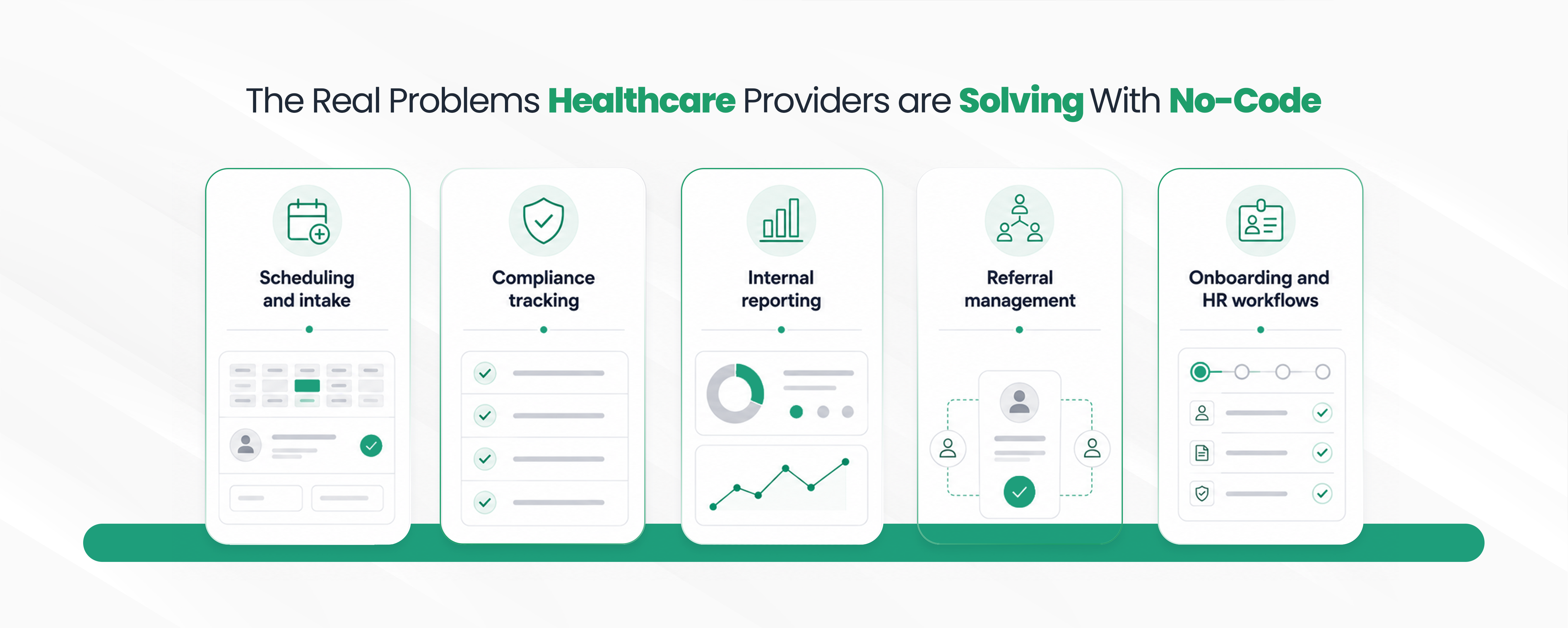
Here's where no-code business process automation are making a measurable difference:
Manual scheduling is a mess. No-code lets clinics build custom intake flows and appointment systems that actually match how they operate. Not how a software vendor assumed they operate.
Staff training. Certifications. Audits. These things have deadlines and paper trails. A custom healthcare dashboard built on a no-code platform keeps everything visible without depending on spreadsheets held together by one person who knows where everything is.
Healthcare data management solutions don't have to be expensive enterprise software. Many clinics are building their own lightweight reporting tools that pull exactly the data they need.
No-code apps can track referral status in real time. Doctors can easily connect with the team when required, as they have better clarity.
Not glamorous. But healthcare operations management tools that handle onboarding reduce errors and save time that nurses and administrators could spend on actual patient work.
There's a broader conversation worth reading about how healthcare automation can specifically help reduce administrative burden.
Traditional development for a custom healthcare app might take six to twelve months. Sometimes longer. You need the requirements documents. Architecture decisions. Dev cycles. QA. Change requests. More dev cycles.
No-code healthcare software compresses that timeline significantly. A working prototype can exist in days. A fully functional internal tool in weeks.
That speed matters because healthcare needs change constantly. A new regulation drops. A department restructures. A grant requires new reporting. With traditional software, every change is a project. With no-code, it's often an afternoon.
Cost is the other side of it. Custom development is expensive. No-code platforms shift costs toward configuration and maintenance, not engineering hours. That's meaningful for smaller clinics and community health organizations that don't have large IT budgets.
Does no-code replace everything? No. Complex clinical systems, anything touching core EHR infrastructure, anything with intense regulatory requirements around the software itself, those still benefit from traditional development. But for the massive category of internal tools and operational apps? No-code wins most of the time.
{CTA button:Try CodeBlox for Free:https://www.codeblox.com/sign-up:Ready to build something that actually fits your team?}
This is usually the first question we get asked.
The short answer: it depends on the healthcare digital platforms, and you have to be deliberate about it. Role-based access control. Data encryption. Audit trails. These are not optional features in healthcare. They are baseline requirements.
There's a solid breakdown of how data security works inside no-code platforms that's worth reading before you commit to any specific tool. The key thing is knowing what questions to ask and what to look for before you build on a platform.
When security is handled properly, no-code is absolutely viable for healthcare. Many hospitals and health systems are already using it for non-clinical workflows. Some are pushing further than that.
More than most people expect. A few real examples:
These aren't just edge cases. These are common problems that healthcare organizations face and try to solve with expensive software. This industry has always been under the impression that they need a software vendor or an in-house dev team.
CodeBlox works with healthcare organizations to build custom no-code solutions that are designed around how the team actually works. Not around what a generic platform offers out of the box.
That might be a healthcare app builder no-code project scoped for a single department. It might be a broader healthcare workflow automation software across multiple locations. The scope varies. The approach is the same: understand the actual workflow first, then build something that fits it.
With CodeBlox, you have full flexibility to build what will work for you. It is easy to build and test.
Healthcare doesn't need more software. It needs software that actually fits. No-code healthcare software is making that possible for organizations that previously couldn't afford custom development or couldn't wait eighteen months for it.
The operational problems aren't going away. Staffing pressures, compliance demands, data fragmentation, and administrative overload are all still there. But the tools to address them are more accessible than they have ever been.
{CTA button:Schedule a call with our experts:https://www.codeblox.com/schedule-demo:Want to see how CodeBlox can help your organization?}
Find answers to the most common questions about our no-code platform and how it can help you build powerful business application solutions without writing a single line of code.
Yes, especially for medical workflow automation, operational tools, internal dashboards, and department-specific systems. Many hospitals use no-code solutions alongside existing enterprise systems to improve efficiency without replacing core infrastructure entirely.
The biggest difference is time. Requirements, architecture, build cycles, testing, changes, more testing. No-code skips most of that. You are working with something in weeks instead of months. And when something needs to change, you change it instantly. You are not waiting on a developer or filing a ticket.
Mostly the operational stuff like intake forms, referral tracking, staff onboarding, compliance checklists, shift management, equipment maintenance logs, incident reporting, vendor contracts, department dashboards. These are real problems that most healthcare organizations are managing through spreadsheets or email threads. No-code gives you an actual system without the wait time or the budget of a full software project.
A lot of teams try to figure out no-code on their own and end up with something that half-works. The tool is built but the workflow doesn't quite fit. Or an integration breaks. Or nobody thought about access control until it was too late. CodeBlox gets into the specifics of how your team actually operates before anything gets built. Then they pick the right platform, build it around your process, handle the integrations, and make sure the security side is properly set up. Less guesswork, fewer headaches after launch.
Quite a few, but don't take that at face value. Always check before you commit to a platform. Most connect via APIs, so EHR systems, billing tools, scheduling software, and communication platforms are generally on the table. Some of these are plug-and-play. Others need proper configuration work. The gap between "this integration is possible" and "this integration actually works the way you need it to" can be wide. Map out what you need to connect upfront and verify it properly.
%20(1).avif)
Tilly leads Operations and Solution Delivery at CodeBlox, partnering with enterprise teams to design scalable business systems before development begins. With hands-on experience across ERP, CRM, finance automation, and industry-specific digital transformation projects, she writes about solution architecture, process optimization, AI-powered workflows, and the practical decisions that determine whether enterprise software succeeds in the real world.