- Solutions
- Pricing
Most software vendors claim to offer an AI solution today, but they usually just provide a basic chat interface.
A recent report from 2026 by McKinsey shows that 88% of organizations are experimenting with AI. Another study by MIT's NANDA, on the other hand, indicates that 95% of these generative AI pilots fail to deliver any financial return.
This massive gap exists because businesses try to patch together separate tools instead of fixing their core workflows.
Therefore, real cost savings happen when you build AI workflow automation directly into your daily operations.
CodeBlox acts as a unified AI operating system and workflow automation platform running on a secure Azure foundation and a true relational database.
It replaces fragile software integrations with AI-powered business automation and lets enterprise teams scale without technical limits.
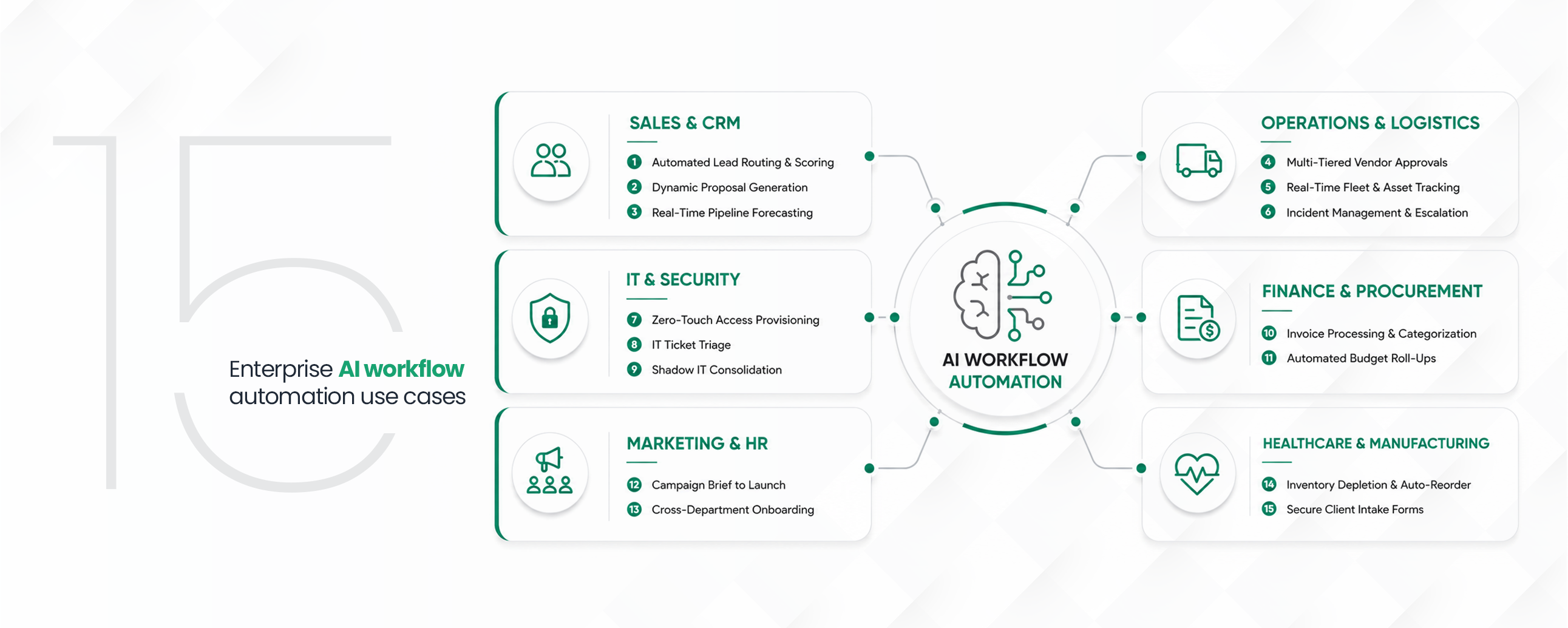
Below are 15 ways companies use CodeBlox to automate routine work and drive clear financial results.
Most software vendors claim to offer an AI solution today, but they usually just provide a basic chat interface.
Most AI workflow automation stalls because it sits next to your work instead of inside it.
The fifteen use cases below share one thing: the AI runs on the same database your team already uses, so it acts on your real records rather than a copy.
In sales, AI workflow management keeps leads and deals moving instead of waiting on manual updates.
When you assign every new lead by hand, your best prospects wait, and slow follow-up costs you deals. A lead you work on in the first few minutes is worth far more than one that sits in a shared inbox for an hour.
Score your leads the moment they arrive and route each one to an available rep by territory. Let the rules do the sorting so no one on your team has to watch a queue to grab the next name.
How CodeBlox helps?
CodeBlox AI scores each lead as it enters the system, and the CRM Builder assigns it through round-robin so your strongest leads reach a rep right away.
Your reps lose hours copying figures into Word, and every manual step is a chance to send a document with the wrong numbers. By the time a proposal is ready, the deal has cooled, and your pricing may already be out of date.
Generate branded proposals straight from your live records so the figures are always current. Your rep picks the deal, and the document builds itself with the right terms and layout.
How CodeBlox helps?
The Document Designer pulls live data from the deal record and builds a branded proposal in one step.
You wait for reps to update spreadsheets before every review, and the numbers are stale by the time you meet. Forecasts built on last week's data lead you to decisions that are already wrong.Roll your pipeline up automatically so revenue is accurate at any moment. Open one view and see where every deal stands without asking anyone for a report.
How CodeBlox helps?
CodeBlox dashboards and chart views show your pipeline and forecasts live. Teams working this way close 34% more deals.
Business workflow automation earns its keep in operations, where one stalled approval can hold up everyone downstream.
Approvals that run through email get buried in inboxes and stall the moment one approver is away. You cannot see where a request is stuck, so it sits until someone thinks to chase it.Route each request through the right people automatically, with a clear deadline at every step. If an approver is out, the request escalates instead of waiting on them.
How CodeBlox helps?
CodeBlox workflow automations move each request across departments using approval triggers and rules, which makes approvals about 2.1x faster.
Tracking vehicles or equipment by calling around for updates leaves you guessing between check-ins. A single wrong location can send a crew to the wrong site or leave a job without its gear.Put every asset on a live map that updates on its own as things move. Your dispatchers see the real position at a glance instead of piecing it together from phone calls.
How CodeBlox helps?
The CodeBlox Map View shows each asset live, and real-time updates push new positions to the screen with no refresh.
When something breaks in your supply chain, the time it takes to find the right supervisor makes it worse. A delayed shipment or a bad batch can spread to other orders before anyone acts.Flag the issue automatically and send it straight to the person who owns it. Keep a record of who was notified and what they did, so nothing falls through.
How CodeBlox helps?
CodeBlox routes the alert through a central notification center, and the activity history logs every action for compliance.
By the end of 2026, Gartner expects 40% of enterprise applications to include task-specific AI agents, up from less than 5% in 2025.
Your new hires wait days for the tools they need while IT sets up each account by hand. Every manual grant is also a login someone can forget to remove when the person leaves.Trigger access automatically from a single HR update across every system you connect. When someone changes role or exits, the same trigger adjusts or revokes what they can reach.
How CodeBlox helps?
One HR status change in CodeBlox provisions access across your stack, using its open API and 200+ integrations for tools like Slack, Salesforce, Microsoft, and Azure.
Password resets and access requests bury your agents under work that never needed a person. Your real problems then wait in the same queue behind dozens of routine ones.Let routine tickets get read, sorted, and answered automatically. Your agents pick up only the cases that actually need judgment.
How CodeBlox helps?
CodeBlox AI reads, categorizes, and answers routine tickets on its own, which cuts ticket volume by up to 80%.
Your teams build their own spreadsheets to fill gaps, and those rogue files are a security risk nobody can see. Sensitive data ends up in places you cannot audit or protect.Rebuild those tools as sanctioned apps you can govern down to the field. Your teams keep the speed they liked without the exposure.
How CodeBlox helps?
The no-code Page Designer lets teams rebuild those tools as approved apps, while Users and Permissions keeps field-level control.
{CTA button:Book a Demo:https://www.codeblox.com/schedule:Ready to see this on your own process? Build your first working app in a week or two. Book a demo}
Handling invoices by hand is slow and leads to payment errors your finance team has to chase down later. Duplicate or missed invoices can quietly cost you real money over a quarter.Capture each invoice, move it through approval, and keep the file with the record. Your whole trail stays in one place for audit and month-end.
How CodeBlox helps?
CodeBlox finance automation workflows track invoices and approvals, and File Management keeps every document attached to the right record.
You often find out a budget is blown only after the money is gone. By then your only options are awkward conversations and cuts somewhere else.Track spending against limits continuously so you get a warning early. Each department sees its own numbers update as costs come in.
How CodeBlox helps?
The CodeBlox Grid View gives spreadsheet-style editing on a real relational database, and built-in formulas update the remaining budget as spending comes in.
Your campaigns slip when creative, ops, and media lose track of who owns what. Work restarts every time a brief lands in a slightly different format.Start every campaign from one intake form that kicks off the whole production sequence. Every task lands with the right owner and the same brief attached.
How CodeBlox helps?
A shareable CodeBlox form feeds the brief straight into a Kanban View, which keeps teams aligned and launches campaigns about 3x faster.
A new hire needs HR, IT, and their manager to act in order, and a dropped task ruins their first week. A missing laptop or login on day one sets the wrong tone and wastes everyone's time.Map who does what and when, so each team completes its part on schedule. Nothing starts late because the step before it was forgotten.
How CodeBlox helps?
CodeBlox HR Management templates assign each onboarding task, and Gantt Charts map how they depend on one another.
Regulated sectors raise the stakes. AI in healthcare operations, for instance, means moving patient data without ever exposing it.
Your floor stops when a material runs out before anyone notices. A single missed reorder can idle a whole line and the people working it.Watch stock levels and reorder automatically the moment they cross a set point. The order goes to the right vendor without waiting for a manual check.
How CodeBlox helps?
CodeBlox handles this with automated inventory management that tracks stock and vendors, and automation workflows raise a purchase order when levels run low.
Sensitive data like patient records has to move from an outside form into your internal systems without being exposed. One insecure step in that handoff can turn into a compliance problem.Collect it through secure forms that feed straight into governed workflows. The data lands where only the right people can open it.
How CodeBlox helps?
CodeBlox forms run on Azure infrastructure with single sign-on and encryption, so intake stays secure from entry through to operations.
The gap between using AI and profiting from it comes down to where your work lives. When every team runs AI workflow automation on one database instead of a dozen disconnected tools, you stop losing time to handoffs. That is the shift CodeBlox is built for.
{CTA button:Book a Demo:https://www.codeblox.com/schedule:Ready to build your first custom operational app? See CodeBlox in action.}
Find answers to the most common questions about our no-code platform and how it can help you build powerful business application solutions without writing a single line of code.
Yes. No-code AI automation lets business users build and change workflows by describing what they want or dragging blocks into place, with no code required. In CodeBlox, the Page Designer and AI build fields, forms, and rules for you, while IT keeps control through permissions. Developers can still add an open API or webhooks when a deeper integration is needed.
AI automation solutions are used across sales, IT, finance, HR, and operations to take over routine work that mixes rules with judgment: routing leads, triaging tickets, processing invoices, onboarding staff, and more. The fifteen use cases above show the pattern. Anywhere a person is copying data or chasing an approval, there is usually a case for automation.
Intelligent workflow automation reads context and acts on it, so it can prioritize an urgent incident, assign a ticket to the right team, or reorder stock before it runs out. That keeps operations moving without constant manual checks. Over time, it also shows where work gets stuck, so you can fix the process itself.
Digital workflow automation is the move from paper, email, and spreadsheets to a system that runs your processes online from start to finish. Every request, approval, and update happens in one place, with a record of who did what. It is the foundation that AI then builds on to take over routine decisions.
AI process automation cuts the hours your team spends on repetitive work, reduces the errors that come with manual entry, and gives leaders live visibility into where things stand. It also frees skilled people to handle the exceptions that actually need judgment. Most teams see faster turnaround and lower operating costs within the first few months.
%20(1).avif)
Tilly leads Operations and Solution Delivery at CodeBlox, partnering with enterprise teams to design scalable business systems before development begins. With hands-on experience across ERP, CRM, finance automation, and industry-specific digital transformation projects, she writes about solution architecture, process optimization, AI-powered workflows, and the practical decisions that determine whether enterprise software succeeds in the real world.
.avif)
%20(1).avif)

%20(1).avif)


.avif)
.avif)
.avif)

.avif)

.avif)
.avif)
.avif)


.png)
.png)
.png)
.png)
.png)
.png)
.png)
.avif)
.avif)
.avif)
.avif)
.avif)
.avif)
.avif)
.avif)
.avif)
%20(1).avif)

.avif)










.avif)
.avif)

.avif)
.avif)

.avif)

.avif)
.avif)

.avif)



%20(1).avif)

.avif)