- Solutions
- Pricing
Most companies run on a mix of spreadsheets, email threads, and software that almost fits. Building custom business applications used to mean a custom software development project that took months and a team of developers. In 2026, a manager can type a request such as "build an approval app for purchase orders" and get a working first version within minutes.
That shift is happening fast. Gartner predicts that 40% of enterprise applications will include task-specific AI agents by the end of 2026, up from less than 5% in 2025. As a result, the list of tools claiming to be the best AI app builders for business keeps growing.
This guide compares eight options, explains how they differ, and helps teams pick the right fit.
Before comparing tools, it helps to know that "AI app builder" covers two very different products.
Most business teams need the second kind. Even so, many developers now rely on AI coding tools, with 65.9% of respondents in the Stack Overflow Developer Survey 2026 using coding assistants or agents. Both approaches fall under AI app development, yet they serve different buyers.
Standalone AI automation platforms mainly move data between tools. An app builder also needs to hold the data and give people screens to work in, so a good AI development platform for business should cover these basics:
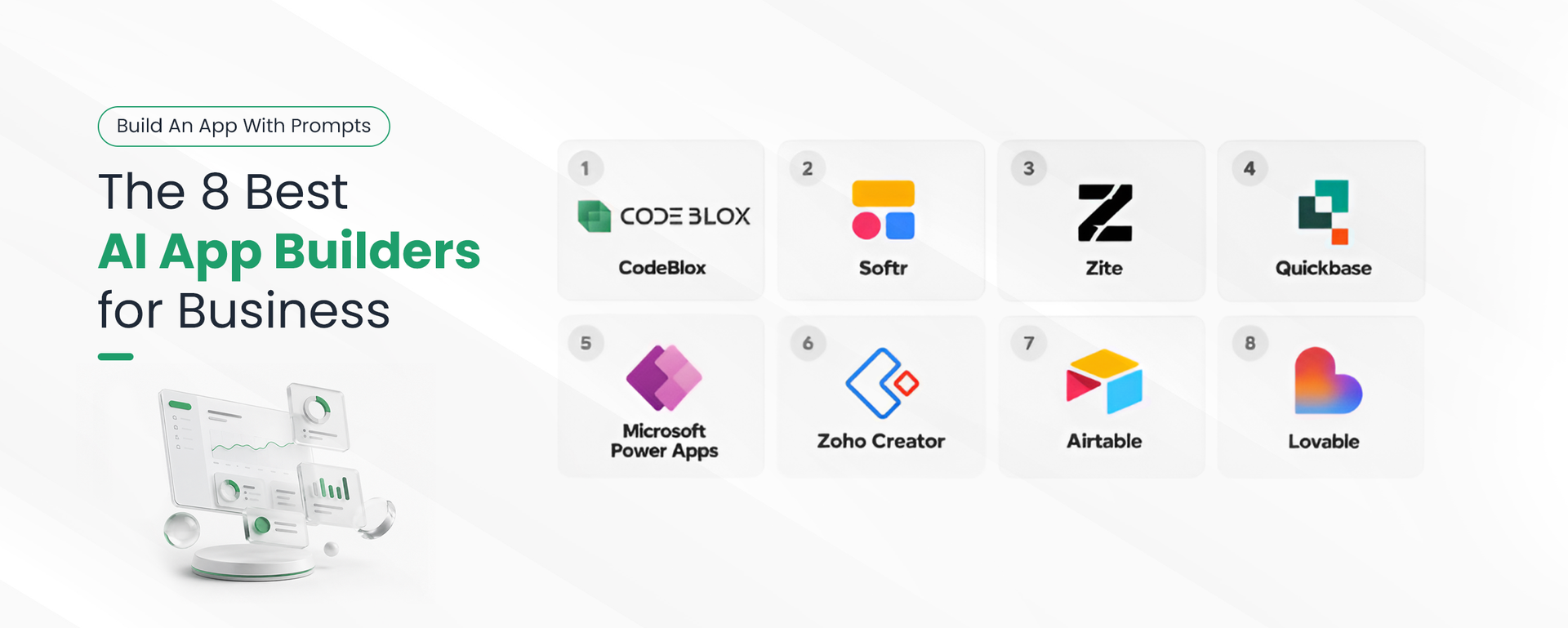
CodeBlox is an AI app builder and a AI no-code platform built for the teams that run the business, such as operations, HR, finance, and sales. It replaces spreadsheets, manual workflows, and disconnected tools with one system that business users build and manage on their own.
Teams describe the app they need, and CodeBlox AI sets up the tables, workflows, permissions, and dashboards, which can then be edited by clicking or with another prompt. Teams can also start from ready-made solutions for CRM, HR, finance, project management, and inventory.
Softr relaunched as an AI-native platform in 2026. Its AI Co-Builder turns a short prompt into an app with a database, user roles, and pages, which teams then refine in a visual editor.
Teams connect a data source such as Airtable or Google Sheets or use Softr's own database and then describe the app. The AI Co-Builder sets up pages, user roles, and basic logic, while finer details are adjusted block by block in the visual editor. Many teams use it to give clients or partners a secure portal on top of data they already have.
Zite is an AI-first builder from the team behind the Fillout form tool. It generates apps with a built-in database and lets teams adjust the logic visually.
Teams describe the app, and Zite generates the screens, database, and workflows. The logic stays visible as flowcharts, so non-technical users can see how the app works and change it themselves. Its flat pricing appeals to small businesses that want to give staff and clients access without paying per seat.
Quickbase serves operations-heavy companies that manage complex data and processes. Its AI Chat-to-App feature builds applications and data structures from plain-language requirements.
When a manager describes a process, such as tracking job sites or equipment, Quickbase AI suggests the tables and fields to support it. Admins then refine the app with low-code tools, automated pipelines, and reports. The platform is built for complex, high-volume operations, which can be more than a small team needs.
{CTA button: Start your free CodeBlox trial:https://www.codeblox.com/schedule-demo:Turn your team's spreadsheets into working business apps without writing code.}
Power Apps is a natural choice for companies already on Microsoft 365. Copilot helps users build apps that connect to SharePoint, Teams, and Dataverse, while Power Automate works alongside it as business process automation software.
Users can describe an app to Copilot, which suggests tables and screens, then fine-tune it in the canvas or model-driven designer. Because Power Apps shares security and sign-in with the rest of Microsoft 365, IT teams can manage it with controls they already use. For companies outside the Microsoft ecosystem, the setup and licensing are harder to justify.
Zoho Creator is a low-code platform for form-driven business apps, such as order tracking and custom CRMs. Its Zia AI assistant helps generate apps, and it connects easily to other Zoho products.
Teams can build from scratch, edit one of the prebuilt apps, or ask Zia to generate a starting point. Apps run on both web and mobile, which suits field teams collecting data on the go. Its low entry price also makes it one of the more affordable options for small and mid-size companies.
Airtable adds AI app building to its familiar spreadsheet-database. Omni, its AI builder, creates tables, interfaces, and automations from a conversation.
From a short conversation, Omni builds the base, interface, and automations using Airtable's existing components. Field Agents can then research, summarize, or analyze records inside the base. It works best for teams that already treat Airtable as their main source of business data.
Lovable is one of the best-known prompt-to-code tools. It turns a description into a full web app with front-end and back-end code that developers can export.
Users chat with Lovable to describe the product, and it writes the code, sets up a backend, and deploys the app. Teams can connect a GitHub repository and keep developing in their own tools. That freedom suits product builders, although it means the business owns all maintenance and security work.
AI application development works best when the tool matches the job and the people who will maintain it. A team replacing a spreadsheet tracker needs something different from a startup building a new product. For a deeper side-by-side view, this AI app builder comparison breaks down features in more detail.
For teams that want ready-made business solutions and prompt-based building in one place, CodeBlox covers the most ground without code.
Choosing among the best AI app builders for business comes down to fit. Prompt-to-code tools suit developers, ecosystem tools suit Microsoft and Zoho users, and prompt-to-tool platforms suit the teams that run daily operations. CodeBlox brings AI-powered app development and ready-made business solutions together, so teams can move off spreadsheets and build what they need on their own schedule.
{CTA button:Get started free:https://www.codeblox.com/schedule-demo:Build your first business app with CodeBlox today.}
Find answers to the most common questions about our no-code platform and how it can help you build powerful business application solutions without writing a single line of code.
Yes, many rapid application development tools now support enterprise needs such as user roles, integrations, and governance. Enterprises should still check scalability, data controls, and pricing before rolling them out widely.
Businesses should look for prompt-based building, workflow automation, ready-made templates, user permissions, and clear pricing. The platform should also be simple enough for non-technical teams to maintain after launch.
Business process automation software handles repetitive steps such as approvals, reminders, and data updates. This reduces manual errors, speeds up work, and frees staff to focus on tasks that need human judgment.
Yes, AI application development can create custom business applications such as CRMs, approval systems, and inventory trackers. The AI builds a first version, and teams adjust it to match their processes.
A no code AI platform lets people build apps through prompts and visual editors instead of writing code. CodeBlox is one example, built for business teams creating internal tools, portals, and workflows.

Chris has spent more than a decade designing and delivering enterprise software for organizations with complex operational requirements. Drawing from real implementation experience, he writes about enterprise architecture, CRM strategy, digital transformation, software modernization, and the challenges organizations face when scaling business operations.