- Solutions
- Pricing
If your team depends on emails, spreadsheets, and Slack to manage work, you are in the same situation as many others.
Research from McKinsey Global Institute shows that 94% of workers spend time on repetitive coordination tasks that could simply be automated. Here, the issue is a lack of structure. Most teams already have a way of working, but it exists only in people’s heads and informal communication.
That is where working with custom project workflows becomes really, really important. And with modern no-code tools, building them has become easy. You no longer need to deal with a long development cycle or technical expertise, as a matter of fact.
Think about how work moves through your team today. A request is sent through email. An approval comes through Slack. A spreadsheet gets updated by multiple people at the same time. Work continues, but only until something changes. When a team member is unavailable or the team grows, the system begins to slow down.
Custom project workflows do not replace how your team works. They give structure to what already exists. Ownership is evident, each step is well-defined, too, and transitions occur consistently. The whole idea is to take an informal process and transform it into one that constantly functions without the need for follow-ups or reminders.
Most off-the-shelf tools are built with fixed assumptions. They offer a limited number of stages, basic conditions, and permission settings that do not reflect how real teams operate. Instead of creating a system that works for their task, teams ultimately modify their approach to fit the tool.
As per a report by Gartner, 84% of enterprises intend to adopt low-code or no-code platforms for internal automation. This figure shows that now, businesses are moving away from rigid tools towards much more flexible systems.
A process feels compromised when a process requires multiple steps, but the tool only supports just a few of them. However, rather than focusing on the design of a product, business process management should reflect how the work actually happens.
Many workflows fail because teams start building before they fully understand their process. Before using any No-code workflow builder, it is important to map out how work moves at a stage level. A structured digital process builder approach helps bring clarity before anything is configured.
Start by identifying every stage your work goes through. Focus on the ‘real steps’ and not the ideal ones. Say, for example, a client project may move through the following:
Next, define ownership at each stage and what triggers the next step. Every stage should have a clear owner and a defined condition for completion. This could be a form submission, a status update, or an approval.
Look at what actually needs a person and what just keeps repeating. Tasks like assigning work, sending notifications, or updating statuses do not need manual effort every time. A no-code business process automation can handle this, and that is where custom workflow automation really helps.
Here is an example of the workflow:
If you want to structure your process before building it, this guide on a digital process builder can help!
{CTA button:Book a Demo:https://www.codeblox.com/schedule-demo:<h3>Ready to map your process before building it? CodeBlox makes it possible to move from process mapping to a working system without writing code</h3>}
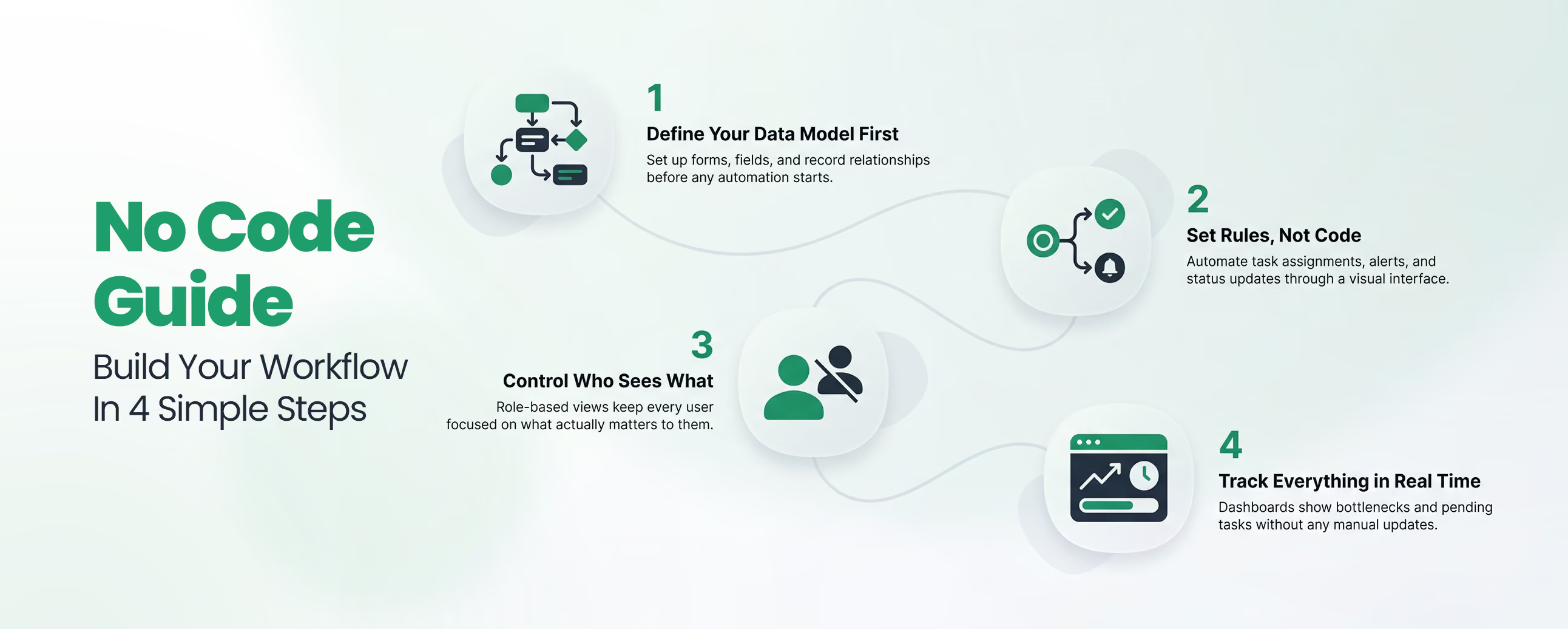
Once your process is clear, building it inside a no-code workflow builder becomes straightforward. The setup follows a logical sequence.
Step 1: Start with the data model
This defines the structure your workflow runs on. In CodeBlox, this is handled through Blox, where you create forms, define fields, and set relationships between records before adding automation.
Step 2: Configure rules and conditions
This is where custom workflow automation replaces manual effort. When a stage is completed, the system can assign the next task, send notifications, and update status automatically. All of this is done through a visual interface without coding.
Step 3: Create role-based views
Not every user needs full access to every detail. An approver may only need to see the current stage and decision request, while an operations manager may need full visibility. Showing role-based views helps people focus on the things that are actually important as well as avoid confusion.
Step 4: Set up reporting and dashboardsWithout the visibility, the workflow still relies on manual updates. Real-time tracking shows where work is, what tasks are pending, and where all the delays are happening.
Custom project workflows are useful across different business functions, especially where processes repeat and involve multiple teams.
Project intake and routing become faster when requests are assigned automatically based on type or priority.
The market for workflow automation reflects this transition. It was valued at around 26.5 billion dollars in 2024 and is expected to grow significantly in the coming years. This shows that businesses are moving toward structured systems instead of informal coordination.
A strong no-code workflow builder should allow flexibility, support logic-based decisions, and scale as your processes grow.
CodeBlox is designed for teams that want a complete system instead of multiple disconnected tools. The Blox layer manages structured data. Workflow rules handle logic and transitions. Dashboards provide real-time visibility. The role-based permissions control access at every stage.
The platform supports both simple and sophisticated workflows without even requiring developer support. As their activities grow, teams can expand from a basic arrangement.
According to Gartner, most new business applications will use low-code or no-code technologies. And many teams that are still managing work manually will start focusing on bringing more structure to the existing processes.
Custom Project Workflows can provide that structure to them. Once that gets implemented, the work is completed with less effort, fewer delays, and more clarity across teams.
{CTA button:Schedule a Demo:https://www.codeblox.com/schedule-demo:<h3>CodeBlox gives you the ability to build that system without writing code.</h3>}
Find answers to the most common questions about our no-code platform and how it can help you build powerful business application solutions without writing a single line of code.
A custom project workflow is a defined sequence of stages, conditions, and ownership rules that reflects how your team moves work from start to the end. It is based on your actual process, including the particular steps, transition circumstances, and role assignments that are relevant to your operation, unlike a generic template.
%20(1).avif)
Tilly leads Operations and Solution Delivery at CodeBlox, partnering with enterprise teams to design scalable business systems before development begins. With hands-on experience across ERP, CRM, finance automation, and industry-specific digital transformation projects, she writes about solution architecture, process optimization, AI-powered workflows, and the practical decisions that determine whether enterprise software succeeds in the real world.
.avif)
%20(1).avif)

%20(1).avif)

.avif)
.avif)
.avif)

.avif)

.avif)
.avif)
.avif)


.png)
.png)
.png)
.avif)
.avif)
.avif)
.avif)
.avif)
.avif)
.avif)
.avif)
.avif)
%20(1).avif)

.avif)







.avif)
.avif)
.avif)
.avif)
.avif)

.avif)
.avif)
.avif)

%20(1).avif)
.avif)