- Solutions
- Pricing
Choosing an app platform is really a choice about who gets to build. The CodeBlox vs Microsoft Power Apps question comes up often because both let teams create business applications without a full development team, but they take very different routes to get there, and they fit very different kinds of organizations.
Microsoft Power Apps is the familiar enterprise name. It is a low-code platform, part of the wider Power Platform, and it rewards companies already deep in Microsoft 365, Dataverse, and the rest of that ecosystem. CodeBlox comes at the same problem from the AI side. You describe the app you want in plain language, and the platform builds it, with ready-made enterprise apps and hundreds of integrations to start from.
This guide compares the two fairly, across ease of use, AI, pricing, workflow automation, and enterprise fit, so you can see which one matches how your team actually works. Both are capable. The better pick depends on your builders and your existing stack, and the sections below should make that clear.
CodeBlox is an AI app builder and no-code development platform built for business teams. The core idea is simple: instead of dragging components around for hours, you describe the app you need in plain language, and CodeBlox builds a working version you can refine. That AI-powered app creation is what sets it apart from older drag-and-drop tools.
There are two ways to start. You can pick from prebuilt enterprise apps in the CodeBlox AppStore, covering common needs like CRM, HR, finance, inventory, approvals, and dashboards, or you can build a custom app from a prompt or in the Design Center. Either way, the goal is a real, usable business application without writing code.
Under the hood, CodeBlox includes the pieces a business app actually needs: a place to store and manage data, multiple ways to view that data, workflow automation for approvals and notifications, and more than 200 integrations with tools teams already use. For buyers weighing it against other tools, the no-code platform features are worth a close look, because that combination of AI building and ready-made structure is where it aims to win.
As a business app builder, CodeBlox aims to make AI powered app development practical for people who are not developers, so custom business software gets built by the teams who actually use it. Pricing starts at around $19 per user per month, and AI building is part of the platform rather than a separate add-on.
Microsoft Power Apps is a low-code development platform for building business applications, and it is one of the most established names in the category. As an application development platform aimed at enterprise application development, it gives larger organizations a governed way to build and manage apps at scale. It sits inside the Power Platform alongside Power Automate for workflows and Power BI for analytics, and it connects deeply to Microsoft 365 and Dataverse, Microsoft's cloud data service.
Power Apps lets builders create two main kinds of apps: canvas apps, where you lay out the screens yourself, and model-driven apps, which generate an interface from your data model. It leans more technical than a pure no-code tool. Business users can build simple apps, but more serious applications usually involve IT, a solution architect, or a professional developer, especially once premium connectors and Dataverse enter the picture.
On the AI side, Microsoft has added Copilot, which can help generate and edit apps from natural-language prompts. That capability is genuinely useful, though using in-app AI and Copilot agents requires both a Power Apps license and a separate Microsoft Copilot license.
The real strength of Power Apps is the Microsoft ecosystem. If your company already runs on Microsoft 365, uses Dataverse, and has IT governance in place through managed environments, Power Apps fits naturally into that world.
Both tools handle business application development, but they frame it differently: CodeBlox as a fast AI app builder and Power Apps as an enterprise app development platform inside the Microsoft stack. Here is how the two compare across the factors business buyers weigh most.
The table shows the pattern clearly. These platforms overlap in what they produce, a working business app, but they differ in who builds it, how much structure sits around it, and how pricing is shaped. The sections below dig into the factors that tend to decide the choice.
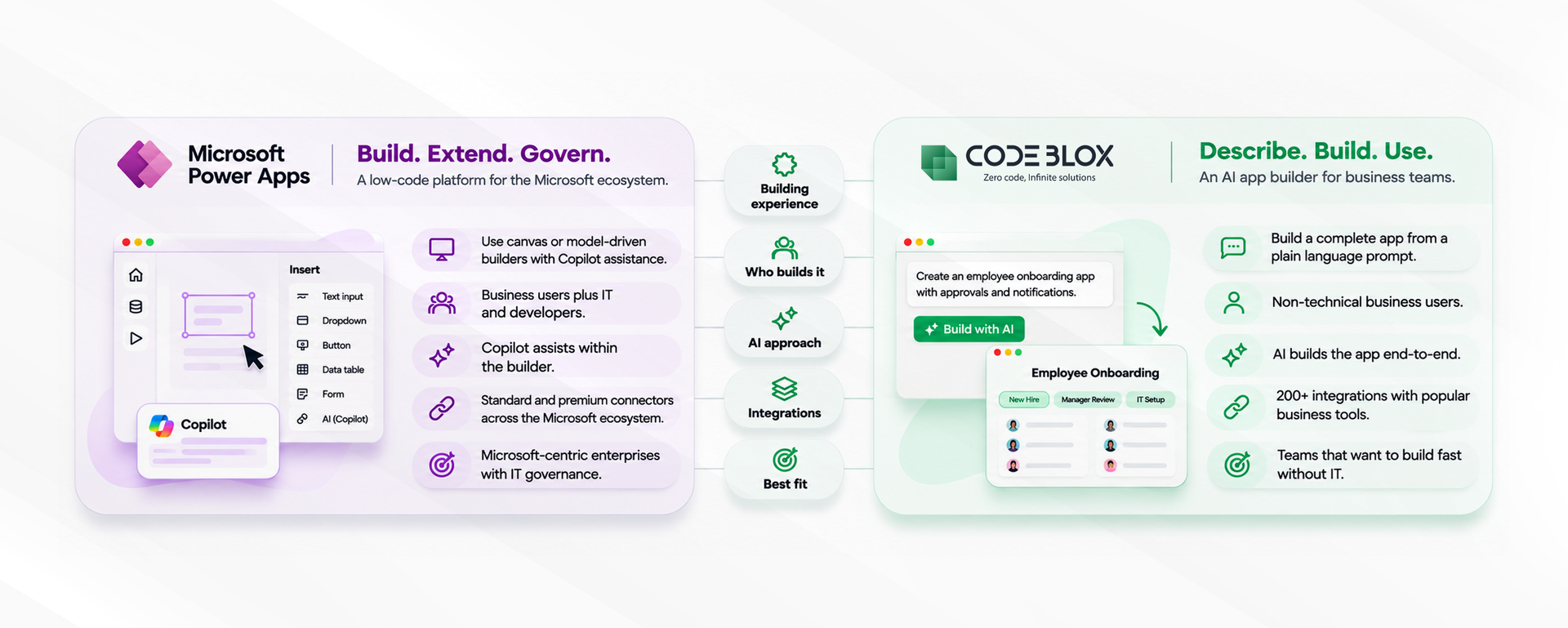
This is where the two platforms differ most, and it is the factor that decides the most cases.
CodeBlox is built so a non-technical person can go from idea to working app. A finance manager who tracks invoice approvals in a spreadsheet can describe what they need and get a real app back, without waiting on a developer queue. The AI handles the structure, and the prebuilt enterprise apps give a running start for common jobs. The learning curve is short because describing an app in plain language is something anyone can do.
Power Apps can also be used by business users, and simple canvas apps are within reach for a motivated non-developer. But the platform shows its depth once an app grows. Model-driven apps, Dataverse schemas, premium connectors, and managed environments are powerful, and they are also concepts most business users will not want to learn. In practice, serious Power Apps projects pull in IT, a solution architect, or a professional developer.
Neither approach is wrong. If you want your business teams building their own tools with little help, CodeBlox lowers the barrier further. If you have an IT function that wants to own and govern app development centrally, Power Apps gives them the controls to do that.
Both platforms use AI, but in different roles, and the distinction matters.
With CodeBlox, AI is the construction method. The prompt is how you build. You tell the platform what the app should do, and it produces the screens, data structure, and logic for you to review and adjust. For teams that do not think in terms of tables and relationships, this removes the hardest part of app building, which is the blank canvas.
With Power Apps, AI arrives as Copilot, an assistant layered on top of the existing builders. Copilot can draft an app from a description and help edit it, which genuinely speeds things up. The difference is that the underlying app is still a Power Apps canvas or model-driven app, so you are accelerating a build you could also do by hand. It is assistance within the tool rather than the tool itself, which keeps Power Apps closer to traditional low code app development than to prompt-first building.
There is also a licensing angle. CodeBlox includes AI building in the platform. Power Apps Copilot and in-app AI agents require both a Power Apps license and a separate Microsoft Copilot license, which is worth factoring into any budget. If you are weighing how these build styles sit against traditional tooling, our guide on Low-Code vs No Code breaks down the trade-offs.
{CTA button:Start building with CodeBlox:https://www.codeblox.com/sign-up:Want to see how fast a prompt becomes a working business app? Try CodeBlox and build your first one in minutes.}
Pricing is where Power Apps gets complicated and CodeBlox stays simple, and for many buyers that difference is a deciding factor.
CodeBlox uses straightforward per-user pricing that starts at around $19 per user per month, with AI building included. There is one main number to reason about, which makes budgeting predictable.
Power Apps pricing has more moving parts. The main plan, Power Apps Premium, is $20 per user per month for unlimited apps for that user, dropping to $12 per user per month at 2,000 or more seats. There is also a pay-as-you-go option at roughly $10 per active user per app per month through Azure billing. Microsoft removed the older $5 Per App subscription from its licensing guide in January 2026 for most new customers, so budget around the per-user plan unless an existing agreement still carries per-app rights.
The add-ons are where real-world Power Apps costs grow. Premium connectors for sources like SQL, Salesforce, and SAP sit behind paid tiers. In-app AI and Copilot agents need a separate Microsoft Copilot license on top of the Power Apps license. Premium includes 500 AI Builder credits per user per month, and more credits are a separate purchase. None of this makes Power Apps a bad deal, especially if you already own Microsoft licensing, but the total cost is harder to predict than a single per-user figure.
The honest summary: if you are already a Microsoft shop, Power Apps licensing can work in your favor. If you are not, CodeBlox gives you a simpler number to plan around.
Most business apps are not just screens; they run processes. Approvals route to the right person, notifications fire, records update, and tasks get assigned. Both platforms handle this kind of workflow automation, with different strengths.
CodeBlox builds automation into the app itself. Approvals, notifications, and routine process steps are part of what you describe when you build, so a vendor-approval flow or an employee-onboarding sequence comes together alongside the app rather than as a separate project. Combined with 200+ integrations, that covers the business process automation most teams need day to day.
Power Apps pairs with Power Automate for workflow, and together they work like business process management software for serious enterprise workflow automation. The ceiling is high, particularly for complex, multi-system processes. The cost is added complexity and, often, added licensing, since premium flows and connectors sit on paid tiers. For a Microsoft-centric enterprise with the governance to manage it, that depth is a genuine advantage.
On enterprise fit more broadly, Power Apps offers mature managed environments and central IT control, which large regulated organizations often require. CodeBlox focuses on getting capable business applications into users' hands quickly, with the structure a company needs without the heavier administrative overhead. If you are comparing against other enterprise-leaning tools too, our CodeBlox vs Creatio breakdown covers a similar trade-off.
There is no single winner here, only a better fit for your situation. A few honest scenarios make the choice clearer.
Power Apps is the stronger pick when your company already runs on Microsoft 365 and Dataverse, when IT wants to own and govern app development centrally, and when you need to build complex, multi-system processes with deep Azure integration. In that world, Power Apps slots into tools and licensing you already have, and the ecosystem advantage is real.
CodeBlox is the stronger pick when you want business teams building their own apps with little or no IT involvement, when speed from idea to working app matters more than deep platform configuration, and when you want simple, predictable pricing with AI building included. For teams outside the Microsoft ecosystem, or ones that find Power Apps too heavy for everyday needs, it removes a lot of friction.
A useful test: look at who will actually build your apps. If the answer is IT and developers inside a Microsoft estate, lean Power Apps. If the answer is business users who want to describe what they need and get it, lean CodeBlox. Many organizations end up using a tool like CodeBlox as their everyday digital transformation platform for fast, team-built apps, and reserving heavier platforms for the few processes that truly need them.
The CodeBlox vs Microsoft Power Apps decision comes down to how your team builds and where your stack already lives. Power Apps is a powerful low-code platform that rewards Microsoft-centric enterprises with strong IT governance. CodeBlox is an AI app builder that gets capable business applications into users' hands fast, with simpler pricing and AI building built in. Both can deliver the app you need; the better choice is the one that matches your builders.
The fastest way to know if CodeBlox fits is to build something with it. Describe an app you actually need and see what comes back.
{CTA button:Start building with CodeBlox:https://www.codeblox.com/sign-up:The fastest way to know if CodeBlox fits is to build something with it. Describe an app you actually need and see what comes back.}
Find answers to the most common questions about our no-code platform and how it can help you build powerful business application solutions without writing a single line of code.
Power Apps uses Copilot to help generate and edit apps from prompts. It is assistance layered on the existing builders, and in-app AI requires both a Power Apps license and a separate Microsoft Copilot license.
Yes. AI is the core building method in CodeBlox. You describe the app you want in plain language, and the platform generates the screens, data structure, and logic for you to review and refine.
CodeBlox is the truer no-code platform, built so non-technical users can create apps from prompts. Power Apps is low-code and often needs IT or developer help once apps grow beyond simple screens.
Yes, especially for teams outside the Microsoft ecosystem or ones that find Power Apps too complex. CodeBlox offers faster AI-driven building and simpler pricing, though Power Apps wins on deep Microsoft 365 integration.
CodeBlox is an AI app builder where you describe apps in plain language. Power Apps is a low-code platform inside the Microsoft ecosystem. CodeBlox suits business users; Power Apps suits Microsoft-centric, IT-governed teams.

Tilly leads Operations and Solution Delivery at CodeBlox, partnering with enterprise teams to design scalable business systems before development begins. With hands-on experience across ERP, CRM, finance automation, and industry-specific digital transformation projects, she writes about solution architecture, process optimization, AI-powered workflows, and the practical decisions that determine whether enterprise software succeeds in the real world.