- Solutions
- Pricing
An AI app builder turns plain-language instructions into a working app with screens, data and workflows. How good that app is depends mostly on the instructions. Clear, specific prompts give the builder enough detail to get close on the first try.
This guide shows how to write AI app builder prompts that produce apps your team can use. It starts with the basics for first-time users, then moves to techniques experienced builders use for complex business apps. Every section includes examples you can copy and adapt.
AI app builder prompts are the written instructions you give an AI app builder to create or change an app. The builder reads the prompt and turns it into screens, a database, user roles, and workflows.
There is one important difference from chat prompts. In an app builder, every missing detail becomes a decision the AI makes for you, such as which fields to add, who can see what, and what happens after a form is submitted.
AI prompt engineering is the practice of writing and refining instructions so an AI model produces the result you want. For app building, it means describing your app clearly enough that the builder makes the same choices you would.
You do not need technical skills to do this well. The best prompts use plain business language, the same way you would brief a new team member.
A good prompt answers the questions a developer would ask before building anything. Most strong prompts cover seven parts.
You do not need every part on day one. Purpose, users, data, and workflow matter most. Look and feel can come later.
Copy this template and fill in the brackets:
Build a [type of app] for [who uses it].
Purpose: [what problem it solves in one sentence]
Users and roles:
- [Role 1]: can [actions]
- [Role 2]: can [actions]
Data to store: [list the main fields]
Screens: [list the main pages]
Workflow: [step 1], then [step 2], then [step 3]
Rules: [required fields, limits, who can see what]
Style: [look and feel]
This is the core of how to write AI prompts for apps. Each line removes a guess the builder would otherwise make.
The fastest way to see the difference is to compare a weak prompt with a strong one for the same app.
Make a leave management app.
The builder has to guess everything here. It does not know who approves leave, which leave types exist, how balances work, or what employees should see.
Build a leave management app for a 120-person company.
Purpose: Let employees request leave and let managers approve it, with balances updated automatically.
Users and roles:
- Employee: submit requests, see own requests and balance
- Manager: approve or reject requests from their team
- HR admin: see all requests, edit balances, export reports
Data to store: employee name, department, leave type (annual, sick, unpaid), start date, end date, number of days, reason, status, approver, comments
Screens: request form, my requests, team approvals, HR dashboard with leave by department
Workflow: employee submits, manager gets an email, manager approves or rejects, employee gets an email, balance updates on approval
Rules: end date must be after start date. Employees cannot request more annual leave than their balance. Sick leave over 2 days needs an attachment.
Style: simple and clean, works well on mobile
The second prompt takes about five minutes longer to write. It usually saves hours of fixes because the builder gets the roles, fields, and approval flow right from the start.
{CTA button:Start building free:https://www.codeblox.com/sign-up:Try your first prompt and see a working business app in minutes.}
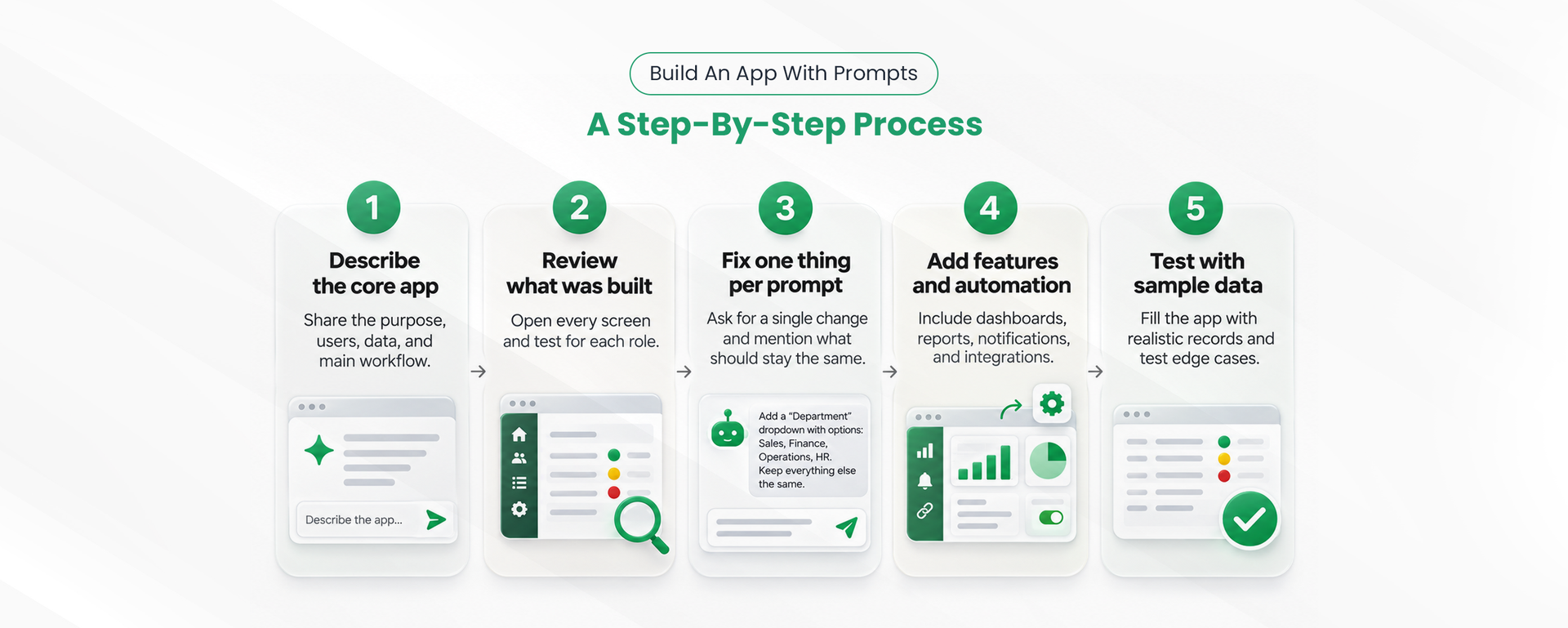
Build in rounds. Start with the core of the app, review it, then add features one prompt at a time. This keeps each change small and easy to check.
Use the template above for the first prompt. Focus on purpose, users, data, and the main workflow. Leave extras like dashboards and integrations for later.
Open every screen and test it for each role. Check that the fields, permissions, and statuses match what you asked for. Write down anything missing or wrong.
Ask for one change at a time, and say what should stay the same. For example:
Add a "Department" dropdown to the request form with these options: Sales, Finance, Operations, and HR. Keep all other fields and the approval workflow as they are.
Once the core works, add dashboards, reports, notifications, and connections to other tools. Describe each new feature in its own prompt.
Ask the builder to fill the app with realistic sample records, then test edge cases such as a request with no attachment or an amount over the limit. This is where most remaining problems show up.
Once the basics feel natural, these techniques help with larger and more complex apps. They are the same habits that make generative AI prompting reliable in any tool.
For complex apps, describe the data before the screens. List each record type, its fields, and how records connect. For example, "Each project has many tasks. Each task has one owner and one status." A clear data model prevents most rework later.
Describe automation in a fixed pattern: when something happens, check a condition, then take an action.
When a purchase request is submitted,
if the amount is over $5,000,
then send it to the finance manager for approval and email the requester.
This format maps directly to how AI workflow automation works inside most builders, so fewer details get lost.
Tell the builder how you will judge the result. For example, "A manager must only see requests from their own team" or "The dashboard must load totals by month." Clear criteria make it easier to spot what is missing.
For a big change, ask the builder to explain its plan before it builds. For example, "Before making changes, list the screens, fields, and workflows you will add or edit." Review the plan, correct it, then let it build.
When editing a mature app, name what must not change. "Do not change the approval workflow or existing user roles" prevents accidental side effects.
Save prompts that worked well, with the result they produced. Over time, this becomes your team's standard for AI app creation and makes results more consistent across builders.
Most weak results come from a handful of repeat mistakes. Each one has a simple fix.
The last mistake matters most for business teams. Prompts may be stored by the platform, so never paste real customer names, salaries, health details, or account numbers into a prompt. Describe the field instead, such as "customer phone number," and let the builder create sample data.
Teams using an AI app builder for business should also agree on who can create and change apps, so prompts follow the same standards across departments.
These prompts cover common business app development needs. Copy one, replace the details with your own, and use it as your first prompt.
Build a purchase request app for a mid-size company.
Roles: employees submit requests, department managers approve, and finance approves anything over $5,000 and marks requests as paid.
Data: item, quantity, unit price, total, supplier, cost center, needed-by date, quote attachment, status.
Workflow: submit, manager approval, finance approval if over $5,000, paid.
Rules: the total is calculated automatically. A quote attachment is required for over $1,000.
Screens: request form, my requests, approval queue, spending dashboard by department.
Build a mobile-friendly site inspection app.
Roles: inspectors complete inspections, and supervisors review and close them.
Data: site, inspector, date, checklist items with pass or fail, photos, notes, follow-up actions, and status.
Workflow: the inspector submits, the supervisor reviews, and failed items create follow-up tasks with due dates.
Rules: photo required for any failed item.
Screens: inspection form, my inspections, open follow-ups, dashboard by site.
Build a client tracker for a small sales team.
Roles: sales reps manage their own clients, the sales manager sees all clients and reports.
Data: company, contact name, email, phone, stage (lead, qualified, proposal, won, lost), deal value, next follow-up date, notes.
Workflow: send a reminder to the rep on the follow-up date.
Screens: client list, client detail, pipeline board by stage, monthly won deals report.
Templates like these make it possible to build business apps without code and still get custom application development results that match how your team works.
Good AI app builder prompts read like a clear brief. They name the users and roles, list the data, describe the workflow, and set the rules. Start with the core app, review it, and improve it in small rounds.
The same habits work whether you are building your first approval form or a multi-team operations app. As AI powered app development becomes part of everyday work, the ability to describe a process clearly is quickly becoming one of the most useful business skills.
{CTA button:Try CodeBlox free:https://www.codeblox.com/sign-up:Put these prompts to work and build your first business app today.}
Find answers to the most common questions about our no-code platform and how it can help you build powerful business application solutions without writing a single line of code.
Prompts replace manual setup of screens, fields, and workflows. A single clear prompt can generate a working first version, which your team then refines in small steps.
State the purpose, name each user role, list the data fields, describe the workflow, and add rules. Build the core first, then make one change per prompt.
It is the practice of writing and refining instructions so an AI model produces the result you want. For app building, it means describing your app clearly enough to avoid guesswork.
They are written instructions that tell an AI app builder what to create or change. A strong prompt describes the app's purpose, users, data, workflow, and rules in plain language.
It shortens build time, lowers costs, and lets business teams create their own tools. Developers can then focus on complex systems that need custom code.

Tilly leads Operations and Solution Delivery at CodeBlox, partnering with enterprise teams to design scalable business systems before development begins. With hands-on experience across ERP, CRM, finance automation, and industry-specific digital transformation projects, she writes about solution architecture, process optimization, AI-powered workflows, and the practical decisions that determine whether enterprise software succeeds in the real world.