- Solutions
- Pricing
.avif)
Every company is rushing to put AI to work, but most are missing a basic point. An AI model can only use the data it can reach.
When that data is trapped in a CRM here, an ERP there, and an HR system that speaks to neither, even the sharpest model spends its time guessing.
AI system integration is what gives those models something solid to stand on.
It connects the CRM, ERP, HR, and finance systems across a business so information flows between them automatically, without anyone hand-coding the connections.
This blog breaks down what fragmented data really costs for businesses like yours, why traditional APIs buckle under it, and how CodeBlox brings together the whole stack so AI has an accurate picture to work from.
What engineers refer to as "spaghetti architecture" is the result of connecting systems one at a time without a clear plan. It is a tangle of an obvious links.
Here, every tool ends up reliant on every other one. Even a simple adjustment in one place can break something somewhere else.
That tangle costs a business in three ways:
Spaghetti architecture builds up gradually. Every new connection a business adds is one more fragile link to maintain. When a vendor updates its software, those links break, and developers lose real work time patching them.
The cost is easy to measure!
MuleSoft's 2025 Connectivity Benchmark Report found that IT teams spend 39% of their time building and maintaining custom integrations. That is roughly two days of every week that are spent on old connections instead of new work.
Well, this is nothing but the integration tax, and it grows with every tool added.
The bigger problem appears when a company adds AI on top of disconnected systems.
An AI model is only as smart as the data it can access. So, if it sees CRM records but cannot see live ERP inventory, it will happily promise stock that is not there. Scattered data slows AI down, and worse, it feeds the model wrong answers that still sound right.
The average enterprise now runs 957 applications, but only 27% of them are connected, as per MuleSoft's 2026 Connectivity Benchmark Report. When nearly three-quarters of the software sits on its own, AI is being asked to understand a business it can only half see.
That gap is where expensive AI projects quietly fail.
There is a cash cost too.
When a deal signed in the CRM takes hours to reach the ERP, procurement runs late, delivery slips, and finance works off numbers that are already out of date.
The loss shows up as small delays on every deal, and they add up.
For years, connecting software meant one of two things.
Either a developer wrote and maintained a custom API, or the business added a simple trigger tool that ran basic if-this-then-that rules.
Both work until the data stops matching. A traditional API expects field names to line up exactly, so the moment one system calls a record Client_ID and another calls it CustomerNum, the connection breaks and someone has to fix it by hand.
AI system integration removes that weak point. Using natural language processing, the AI understands what a field means instead of needing the labels to match exactly.
Put simply, it can connect Client_ID in HubSpot to CustomerNum in SAP without a developer writing any code, and it keeps working even when the system changes later. That’s the real difference between CRM ERP integration that breaks the first time something changes and integration that adjusts on its own.
Moving data is only the first step.
AI workflow automation also reads that data as it moves. It catches errors before they spread and decides what happens next. And when a large order lands in the CRM, the system checks the customer's credit and confirms stock in the ERP before opening a fulfillment task.
CodeBlox runs this logic through its workflow automations, so a single event sets off the right actions across several systems at once.
See how CodeBlox connects your entire enterprise stack in minutes and lets your systems stay in sync.
{CTA button:Request a custom CodeBlox demo:https://www.codeblox.com/schedule-demo}
A no-code integration platform is easiest to understand department by department, because that is where disconnected data hurts most and where connecting it pays off fastest.
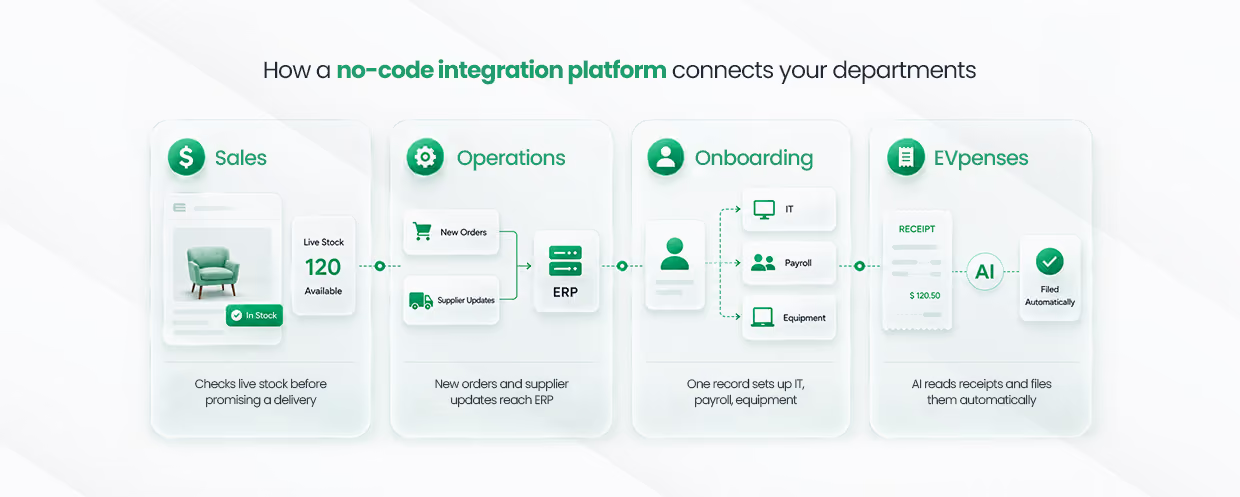
Sales teams lose deals to bad timing. AI CRM integration fixes that by scoring leads on live data and checking the facts before a rep promises anything.
When a good lead comes in, the system can rate its fit, pull current stock levels straight from the ERP, and tell the rep whether a delivery date is safe. The CRM stops being a static contact list and starts acting on information as it changes.
Out-of-date data is where operations quietly go wrong, and an ERP integration platform is what prevents it.
New orders, stock changes, and supplier updates land in the ERP the moment they happen, with no one keying them in by hand.
That means planners are always working from current numbers, so purchasing and production scheduling decisions hold up instead of relying on stale figures.
Onboarding one employee touches IT, payroll, finance, and facilities alongside HR. Without HR management software connected to those systems, every handoff turns into a manual entry that someone has to complete and track.
Once HR management software is connected to a central workflow automation platform, adding a new employee starts everything else on its own.
The record HR enters sets up IT accounts, requests equipment, and creates the finance and payroll details, all without a separate request for each step.
The new hire is ready on day one instead of waiting a week for accounts to catch up.
Expenses are another quiet time sink that integration removes.
AI reads a submitted receipt, sorts it into the right category, and posts it to the finance system and the correct ERP project code on its own, which cuts out the manual matching that usually piles up at month's end.
CodeBlox covers this in more detail in its guide to Enterprise Finance Automation, where finance data moves without the usual copy-paste between tools.
The payoff here is real, not theoretical. Gartner estimates that poor data quality, much of it caused by disconnected systems passing each other bad information, costs the average organization $12.9 million a year.
Closing the gaps between departments is one of the most direct ways to stop that loss.
Understanding AI system integration is one thing. Running it across a live business is another, and this is what CodeBlox is built for.
CodeBlox is more than a simple connector that moves fields between two apps. It is a full enterprise software integration engine built to run operations across the whole software stack.
Most integration tools still assume a technical person is doing the setup. CodeBlox removes that need.
It uses AI agents that manage the connections themselves and lets business leaders describe what they want in plain language.
A COO or CFO can build a workflow across several systems just by typing what they need, so integration stops waiting in the IT backlog.
CodeBlox works the same way with hundreds of tools through its library of No-Code Integrations, so adding a new system does not need a new engineering project every time.
Scale is where simple tools fall over.
CodeBlox can move large amounts of data across older systems and modern cloud services at the same time. It also replaces fragile point-to-point APIs with smart connections that repair themselves when something goes wrong.
That reliability is what makes real automation possible rather than just a demo. When the connections underneath a business are dependable, the AI running on top can be trusted to act without someone checking its work at every step.
Over the next few years, how well a company's systems are connected will matter more than how many tools it runs. Here is what that means in practice.
Connecting CRM, ERP, HR, and finance used to take a large engineering team and months of work. It doesn't anymore.
AI system integration puts that decision back with the people running the business, and the ones treating it as a priority are already pulling ahead. The only real question left is how soon you start.
{CTA button:Explore CodeBlox solutions:https://www.codeblox.com/core-solutions:Systems should work for the business. CodeBlox gives teams real operational autonomy by linking the entire tech stack through intelligent, no-code AI.}
Find answers to the most common questions about our no-code platform and how it can help you build powerful business application solutions without writing a single line of code.
It eliminates expensive developer costs and puts control back in your hands. You can automate your entire business using simple visual tools rather than relying on complex engineering teams.
Old IT projects took months to finish. A smart no-code integration platform gets your core systems talking to each other and running live in just hours.
100 percent. Anyone can use a visual workflow automation platform to connect their tools. Small teams can scale up fast without hiring an expensive tech crew.
Absolutely. Top platforms protect your data with strict access controls and encryption. Your enterprise software integration stays totally safe and meets global security rules.
You can automate employee onboarding, expense approvals, and stock updates. Enterprise software integration handles the boring, repetitive tasks so your team can focus on growth.
%20(1).avif)
Chris has spent more than a decade designing and delivering enterprise software for organizations with complex operational requirements. Drawing from real implementation experience, he writes about enterprise architecture, CRM strategy, digital transformation, software modernization, and the challenges organizations face when scaling business operations.
.avif)
%20(1).avif)

%20(1).avif)

.avif)
.avif)
.avif)
.avif)

.avif)
.avif)
.avif)


.avif)
.avif)
.avif)
.avif)
.avif)
.avif)
.avif)
.avif)
.avif)
%20(1).avif)




.avif)
.avif)
.avif)
.avif)
.avif)

.avif)
.avif)
.avif)
%20(1).avif)
.avif)