- Solutions
- Pricing
"AI app builder" has become a catch-all label. It now covers tools that generate a marketing website, platforms that publish iPhone apps, systems for internal approval tools, and products that build AI agents. They share a prompt box, but the results they produce are very different.
That overlap makes buying decisions harder. A team looking for a field inspection app can easily end up with a tool built for landing pages, or one that only works in a mobile browser.
This guide explains the main types of AI app builders, what each one is built for, and how to match the right type to the app your business needs.
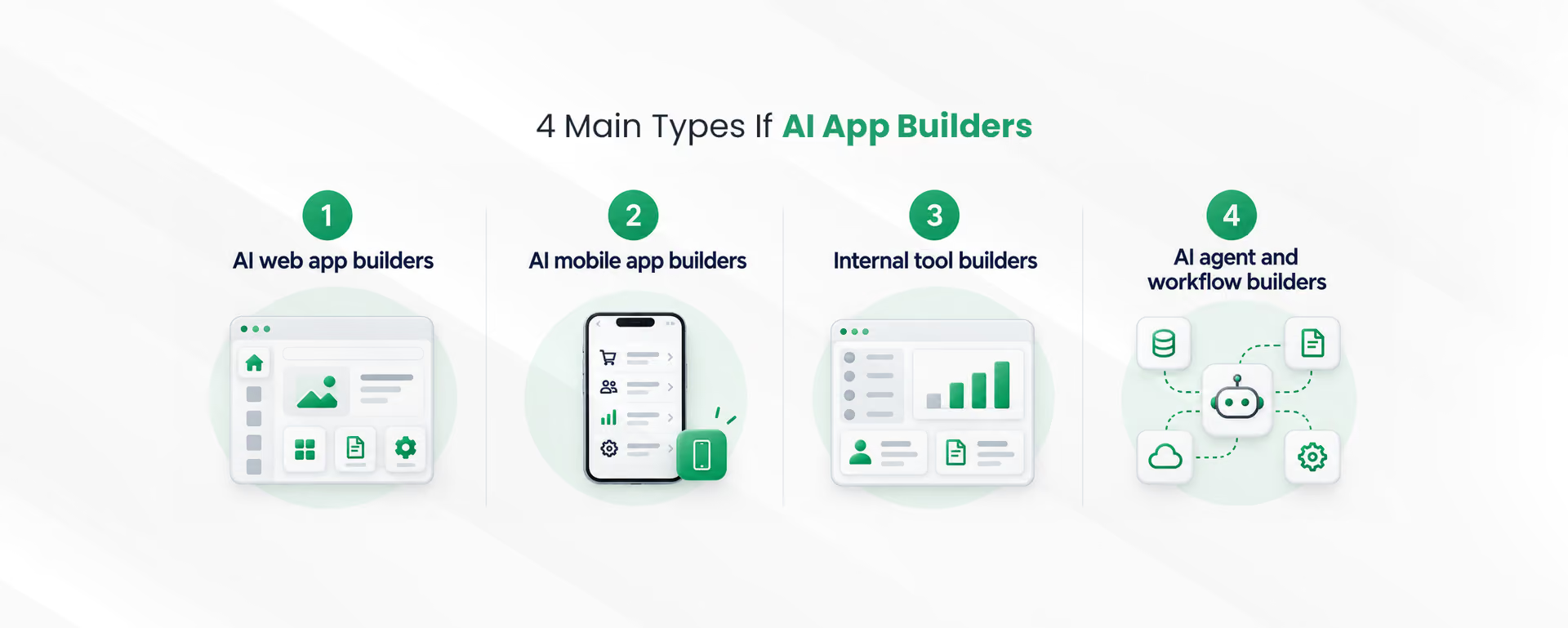
AI app builders fall into four main types based on what they produce: web apps, mobile apps, internal business tools, and AI agents or workflows. Some platforms cover more than one type, but each is usually strongest in one area.
Here is a quick view of each type:
It also helps to separate two ideas that often get mixed up. Some platforms use AI to build the app for you. Others let you add AI features, such as text generation or document reading, inside an app you build yourself. Most modern AI application development platforms now do both.
An AI web app builder creates applications that run in a web browser from a plain-language description. It generates the pages, database, and logic, then hosts the app at a web address that users can open on any device.
This type covers a wide range. At one end, AI website development tools produce marketing sites and landing pages. On the other hand, a web application builder can create customer portals, booking systems, or lightweight software products with user accounts and stored data.
Web app builders are usually the right fit for:
One point to check is what happens after the first version. Some web builders are excellent for prototypes but harder to scale, so it is worth confirming how the platform handles larger user numbers, permissions, and integrations.
An AI mobile app builder creates apps that people use on phones and tablets. The important detail is what kind of mobile app it produces, because that decides where the app can be installed and what it can do.
Mobile output usually falls into three forms:
Many tools marketed for no code mobile app development produce the second or third form. That is often fine for internal teams, such as field staff filling in inspection forms. However, if customers need to download your app from an app store, confirm that the platform supports native publishing before you start.
For mobile application development aimed at the public, also plan for app store review. Apple and Google both review apps before release, so launch dates need some buffer.
An internal tool builder creates applications that a company's own teams use to run daily operations. These include approval systems, inventory trackers, CRM-style records, HR requests, and reporting dashboards.
This is where business application development often gets stuck. Internal tools rarely win a place on the IT roadmap, so teams fall back on spreadsheets and email threads. An AI builder changes that by turning a short description of the process into a working app with forms, data tables, roles, and approval steps.
What makes this type different is its focus on data and control rather than design. Strong internal tool builders usually include:
These AI-powered business applications replace scattered spreadsheets with one structured system, and the team that uses them can usually maintain them too.
{CTA button:Start building free:https://www.codeblox.com/sign-up:Describe the business app your team needs and see it built in minutes.}
An AI agent builder creates software agents that can read information, make decisions within set rules, and take actions across business systems. An AI workflow builder is closely related, but it focuses on automating a sequence of steps, such as routing a request, updating a record, and notifying a manager.
The difference matters in practice. A workflow follows a defined path every time. An agent decides which step to take next based on the situation, which makes it more flexible and also harder to control.
Interest is growing fast. According to Gartner, 33% of enterprise software applications will include agentic AI by 2028, up from less than 1% in 2024. The same research also warns that more than 40% of agentic AI projects will be canceled by the end of 2027 because of rising costs, unclear value, or weak risk controls.
That warning points to a sensible approach. Start with AI automation tools for clear, repeatable processes, then add agent decisions where the rules are well understood. Common uses include:
Platforms built for AI workflow automation make this easier because the workflow, the data, and the business app live in one place.
Tool comparisons usually focus on features and pricing. For a business, a few less visible factors often decide whether the app still works well a year later.
Real operations rarely need just one type of app. A field service team, for example, may need a mobile app for technicians, an internal dashboard for managers, and an automated workflow for invoicing. If each part sits in a different tool, data has to be copied between them. A platform that supports several app types on the same data avoids that problem. An AI integration platform also helps by connecting those apps to CRM, ERP, and accounting systems you already use.
Check where data is stored, whether it can be exported, and what happens if you leave the platform. Some builders allow code export, while others keep the app inside their hosting. Neither is wrong, but the answer should be clear before you commit.
For enterprise application development, look for single sign-on, role-based permissions, audit logs, and security certifications. Enterprise AI applications also need human approval for sensitive actions, especially when agents can change records or contact customers.
The right type of AI app builder depends on who will use the app, where they will use it, and what it needs to do. Answering those questions first narrows the field quickly.
A simple way to match the need to type:
For most companies, the first useful app is an internal one. It solves a known problem, has a clear group of users, and carries less risk than a public product. Teams that want to build business apps without code can start there and add mobile access or automation later.
When requirements go beyond what any builder supports, such as complex algorithms or a large consumer product, custom software development is still the better route. Many businesses use both, with builders for operations and custom code for the core product.
The types of AI app builders differ more than their marketing suggests. Web builders serve browser-based apps, mobile builders serve phone users, internal tool builders run daily operations, and agent builders automate work across systems.
Start with the app your team needs most, check how the platform handles data and permissions, and keep room to grow. A platform that supports several app types on one data layer will usually serve a growing business better than a separate tool for every need.
{CTA button:Try CodeBlox free:https://www.codeblox.com/sign-up:Build your first business app and automate the work around it.}
Find answers to the most common questions about our no-code platform and how it can help you build powerful business application solutions without writing a single line of code.
Many are, provided they offer single sign-on, role-based access, audit logs, and security certifications. Enterprises should also confirm data storage location, export options, and approval controls for sensitive actions.
An AI application development platform builds apps with screens, data, and users. An AI agent development platform builds agents that act on data and make decisions, often working behind those apps.
An AI workflow builder automates a sequence of business steps, such as routing a request, updating records, and sending notifications. It supports business process automation without manual handoffs.
Yes. Businesses can describe a process in plain language and get a working app with forms, data, roles, and workflows, then adjust it as their needs change.
Yes. Some AI builders publish native apps to the App Store and Google Play, while others create progressive or responsive web apps that work well in mobile browsers.

Chris has spent more than a decade designing and delivering enterprise software for organizations with complex operational requirements. Drawing from real implementation experience, he writes about enterprise architecture, CRM strategy, digital transformation, software modernization, and the challenges organizations face when scaling business operations.