- Solutions
- Pricing
Let's start with a simple question, what is a custom ERP?
Most ERP systems expect your business to fit the way the software works. Custom ERP Software flips that approach. It's built around your existing processes. Therefore, your teams no longer have to change how they work just to fit a standard system.
It connects departments like sales, inventory, and finance into one working structure that reflects real processes on the ground.
For years, buying Enterprise Resource Planning Software meant buying a rigid template. Businesses would sign a contract, then spend the next year or two bending their own workflows around a vendor's pre-built modules.
Staff learned menus that didn't match how they actually worked. IT teams patched gaps with spreadsheets and side tools. The software led, and the business followed.
That pattern is breaking down in 2026.
Rather than adjusting their operations to fit pre-built ERP software, businesses are using No-Code Enterprise Applications to create solutions that work for them.
CodeBlox has become a go-to engine for this shift, giving operations teams a way to design software around their processes instead of the other way around.
A no-code ERP still depends on a database to store and connect your business data.
The difference however, is that you don't have to build or manage it yourself.
Modern low-code ERP platforms let you create the entire structure through a visual interface. Thus, making enterprise software development simpler and significantly much more faster.
Here's how it works:
This gives businesses the flexibility to build custom ERP software without sacrificing the reliability, scalability, or performance of a traditional enterprise system.
CodeBlox supports more than 40 distinct data field types, covering everything from currency and dates to file attachments and linked records.
This gives non-technical teams genuine database power without needing anyone on staff who can write a line of code.
The table below breaks down where a custom no-code build diverges from a traditional off-the-shelf ERP rollout.
| Factor | Traditional ERP | Custom No-Code ERP |
|---|---|---|
| Setup time | Months to over a year | Days to a few weeks for a first working version |
| Customization | Limited to vendor's modules | Built around the business's exact workflow |
| Data ownership | Often locked into vendor's schema | Fully visible and editable by the business |
| Integration approach | Custom-coded connectors per tool | Native connectors plus open API and webhooks |
| Team required | Developers, consultants, IT staff | Operations staff using drag-and-drop tools |
Most businesses don't outgrow their ERP because it's broken. They outgrow it because it no longer fits the way they operate.
Off-the-shelf Business Management Software is built to serve thousands of companies, which means it's designed around standard processes rather than your unique workflows. As your business grows, teams often end up relying on spreadsheets, manual workarounds, and third-party integrations to fill the gaps.
Some of the most common challenges include:
These inefficiencies don't just slow teams down. They increase the chances of reporting errors, duplicate records, delayed approvals, and poor customer experiences.
Custom ERP Software takes a different approach. Instead of forcing your business to adapt to predefined modules, it adapts to the way your business already works.
By building No-Code Enterprise Applications around your existing processes, you can:
The impact goes beyond convenience.
One CodeBlox client, Simply Fresh Foods, replaced multiple disconnected systems with a single custom platform. The result was a 50% reduction in operational costs and 100% billing accuracy, all without increasing headcount.
The improvement came from eliminating unnecessary manual work and building software that matched the company's actual business processes.
If your team is constantly chasing approvals, updating spreadsheets, or manually moving information between systems, those aren't isolated problems. They're signs that your software no longer supports the way your business operates.
That's where Custom Business Process Automation makes the biggest difference.
By designing workflows around your operations instead of adapting your operations to generic software, you can eliminate repetitive tasks, improve visibility across departments, and give every team access to the same real-time information.
{CTA button:Schedule a Demo:https://www.codeblox.com/schedule:Ready to see what that could look like for your business? Book a discovery call with the CodeBlox team and explore how a custom no-code ERP can replace disconnected tools with one platform built around your workflows. Book a discovery call with the CodeBlox team and explore how a custom no-code ERP can replace disconnected tools with one platform built around your workflows.}
Building a Custom ERP Software solution is only the first step. Its real value comes from what happens after your data, people, and processes are connected. That's where ERP Workflow Automation transforms a system from a central database into an active part of your daily operations.
Instead of relying on teams to manually update records or notify the next department, the ERP handles routine processes automatically based on predefined business rules.
For example, a single approved sales order can trigger multiple actions simultaneously:
This is the foundation of Custom Business Process Automation, where one business event initiates a series of connected actions without requiring manual intervention. The result is faster operations, fewer human errors, and greater consistency across departments.
Automation becomes even more powerful when your ERP communicates seamlessly with the other applications your business relies on. Most organizations use multiple systems for CRM, accounting, payments, logistics, or customer support, making integration a critical part of any modern ERP strategy.
A robust no-code integration platform allows these systems to exchange data through APIs and webhooks without requiring custom development for every connection. This ensures information flows securely and accurately across your technology stack.
One of the most common examples is CRM ERP Integration. When customer information, quotations, and sales orders move automatically from the CRM into inventory, procurement, and finance, every department works with the same real-time data.
Sales knows what's available, operations know what needs to be fulfilled, and finance has complete visibility into revenue without duplicate data entry or disconnected reports.
For many years, no-code platforms were seen as tools for building simple internal applications. That perception has changed dramatically.
Today's enterprise-grade No-Code Enterprise Applications are designed to support complex business operations while meeting the performance, governance, and security requirements of growing organizations.
Modern platforms combine scalable cloud infrastructure, role-based access controls, audit trails, and advanced integrations, making them capable of supporting everything from finance and supply chain management to large-scale operational workflows.
The question is no longer whether a no-code ERP can scale. It's whether your business can afford to keep relying on disconnected systems and manual processes when a modern, enterprise-ready alternative is available.
Security teams evaluating a no-code ERP care about the same things they'd care about in any custom-built system: who can see what, who can change what, and whether every action leaves a trace.
CodeBlox runs on a secure Microsoft Azure foundation and includes the guardrails enterprise security teams expect, including granular Role-Based Access Control that limits what each user can view or edit, row-level security permissions that control access down to individual records, and audit trails that can't be altered after the fact. None of these protections require a single line of code to configure.
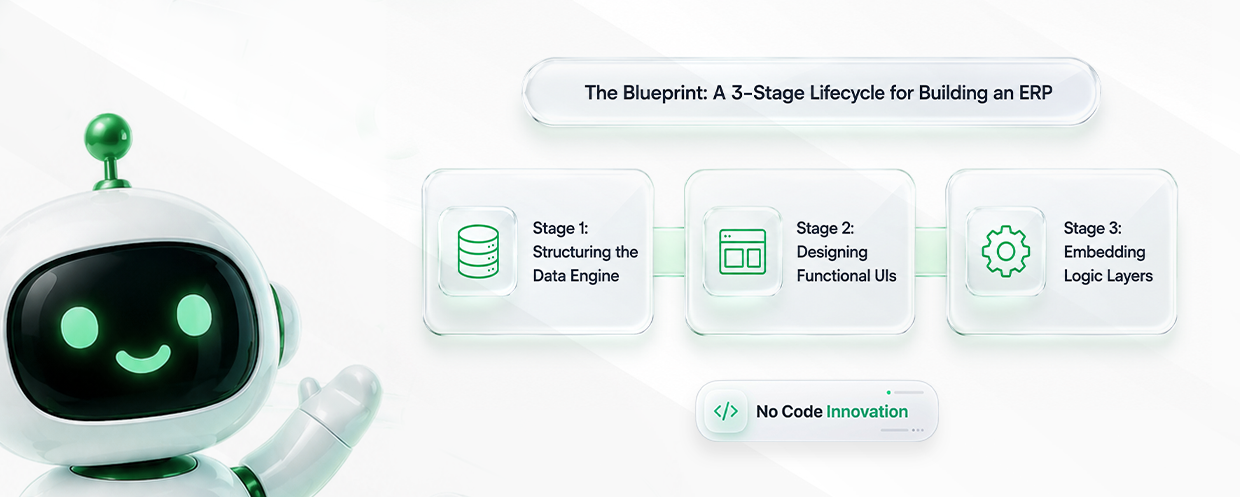
Building a working ERP without a development team sounds abstract until it's broken into stages. In practice, the process tends to follow three clear phases.
The first stage is defining the data model itself, meaning the fields, tables, and relationships that will hold the business's information. This is where customer records, product catalogs, and order histories get their structure, all set up visually rather than through raw database code.
Once the data engine exists, the next step is building the interfaces different people will actually use. A warehouse manager needs a different dashboard than a finance lead, and drag-and-drop design tools make it possible to build both without duplicating the underlying data.
The final stage adds the automation and validation rules that make the system act intelligently. This includes the triggers behind ERP Workflow Automation, along with rules that stop bad data from entering the system in the first place, like requiring a purchase order number before an invoice can be approved.
Rigid, pre-packaged software made sense when building an alternative required a full engineering team and a long timeline. That trade-off doesn't hold up anymore.
In 2026, assembling a Custom ERP Software system through a no-code platform is often faster to deploy and easier to adapt than settling for a vendor's fixed template, without giving up the security or scale a growing business needs.
Teams ready to see what this looks like in practice can explore CodeBlox's pre-built business architecture templates or start a free 15-day trial to test the flexibility firsthand.
{CTA button:Book a Demo:https://www.codeblox.com/schedule:Teams ready to see what this looks like in practice can explore CodeBlox's pre-built business architecture templates or start a free 15-day trial to test the flexibility firsthand.}
Find answers to the most common questions about our no-code platform and how it can help you build powerful business application solutions without writing a single line of code.
%20(1).avif)
Chris has spent more than a decade designing and delivering enterprise software for organizations with complex operational requirements. Drawing from real implementation experience, he writes about enterprise architecture, CRM strategy, digital transformation, software modernization, and the challenges organizations face when scaling business operations.
.avif)
%20(1).avif)

%20(1).avif)

.avif)
.avif)
.avif)
.avif)

.avif)
.avif)
.avif)


.png)
.png)
.png)
.png)
.png)
.png)
.png)
.avif)
.avif)
.avif)
.avif)
.avif)
.avif)
.avif)
.avif)
.avif)
%20(1).avif)

.avif)



.avif)
.avif)
.avif)
.avif)
.avif)

.avif)
.avif)
.avif)
%20(1).avif)
.avif)